
ALL PROJECTS
CASE STUDY · ENTERPRISE INVESTIGATIVE PLATFORM · 2026
Dossier — End-to-End Intelligence Synthesis and Field Evidence Capture
ROLE
Lead Product Designer (Design Systems & Prototyping)
Domain
Law Enforcement, OSINT & Investigative Tech
Platform
Web Application (Desktop Analytical Hub + Mobile Companion)
Deliverables
Information Architecture, Systems Design, AI Interaction Model, Functional React Prototype
Impact & Performance Signals
< 60s Evidence Triage
Reduced unorganized media ingestion, transcription, and entity tagging from multi-hour manual logging to rapid triage.
Automated Conflict Detection
Replaced manual alibi reconciliation with active temporal-spatial conflict warnings and transit-time validation.
Hardware-Level Integrity
Embedded client-side SHA-256 cryptographic hashing and automated EXIF/GPS coordinate stamps at the point of capture.
PROBLEM STATEMENT & MOTIVATION
Project Background and The "Why"
Complex investigations generate staggering volumes of disjointed data: dispatch notes, audio interviews, physical evidence photos, surveillance footage, and handwritten tips. Currently, investigators, OSINT researchers, and missing-persons teams rely on a patchwork of consumer tools (spreadsheets, cloud drives, pinboards, voice memos).
01
Contradiction Blindspots
Critical timeline conflicts get buried because transit times and alibi intervals are calculated manually across disconnected files.
02
Field-to-Desk Latency
Field observations lag analytical review by hours or days, causing active leads and scene details to go cold.
03
Evidentiary Degradation
Chain of custody erodes when photographic and audio assets lack automated cryptographic verification and hardware-level telemetry at capture.
Having followed open-source intelligence methodologies and investigative workflows for years, a persistent operational gap became clear: civilian researchers, volunteer advocacy groups, and cold case teams were attempting to solve complex, high-stakes cases using fractured consumer apps. Most software in this domain acts as passive data storage. Dossier was designed around a different premise: modern investigative tools should actively perform the heavy cognitive lifting by surfacing temporal contradictions automatically and transforming unstructured field observations into verified, relational intelligence the moment they are recorded.
PRODUCT ARCHITECTURE & SYSTEMS STRATEGY
Core Strategic Architecture: The Dual-Surface System
Investigative work operates across two diametrically opposed environments: high-focus analytical synthesis in the office, and high-tempo, low-dexterity capture in the field. Attempting to solve both with a single responsive desktop web layout compromises both experiences. Dossier is deliberately built as two specialized surfaces powered by a single continuous data model.
SYNTHESIS SURFACE · BROWSER
The Desktop Analytical Hub:
Target User: Analysts, lead detectives, and forensic researchers
Primary Objective: High-density cross-referencing and contradiction analysis
Core Interactions: Multi-pane entity mapping, bulk media staging queue, temporal timeline scrubbing, and evidentiary auditing.
Ergonomic Focus: Keyboard shortcuts, dense data visibility, and wide multi-column layouts.
CAPTURE SURFACE · MOBILE WEB / PWA
The Desktop Analytical Hub:
Target User: Analysts, lead detectives, and forensic researchers
Primary Objective: High-density cross-referencing and contradiction analysis
Core Interactions: Multi-pane entity mapping, bulk media staging queue, temporal timeline scrubbing, and evidentiary auditing.
Ergonomic Focus: Keyboard shortcuts, dense data visibility, and wide multi-column layouts.
Key Features & Design Decisions
Deep Dive: Desktop Analytical Hub
Designed for high cognitive clarity, systematic audit trails, and multi-stream timeline analysis.
Explore the Dossier Hub Yourself ↗
Workspace Hub & Multi-Case Synthesis
Design Rationale
Investigative teams juggle multiple concurrent operations where leads develop non-linearly. Traditional directory structures hide operational velocity, forcing analysts to manually check whether a case has gone stale or received fresh evidence. The Workspace Hub acts as an operational radar, exposing open contradiction counts, active entity density, and local vault security states before diving into a specific dossier.
Interaction Model
The dashboard organizes active, review-stage, and cold cases into dense status cards. Analysts can scan key metrics at a glance, such as pending contradiction flags, newly indexed files, and last-activity timestamps. Primary actions prioritize frictionless entry via New Case creation or one-click Import Dossier ingestion, while the persistent local-vault monitor confirms zero cloud leakage for sensitive casework.
Evidence Ingestion & Entity Extraction
Design Rationale
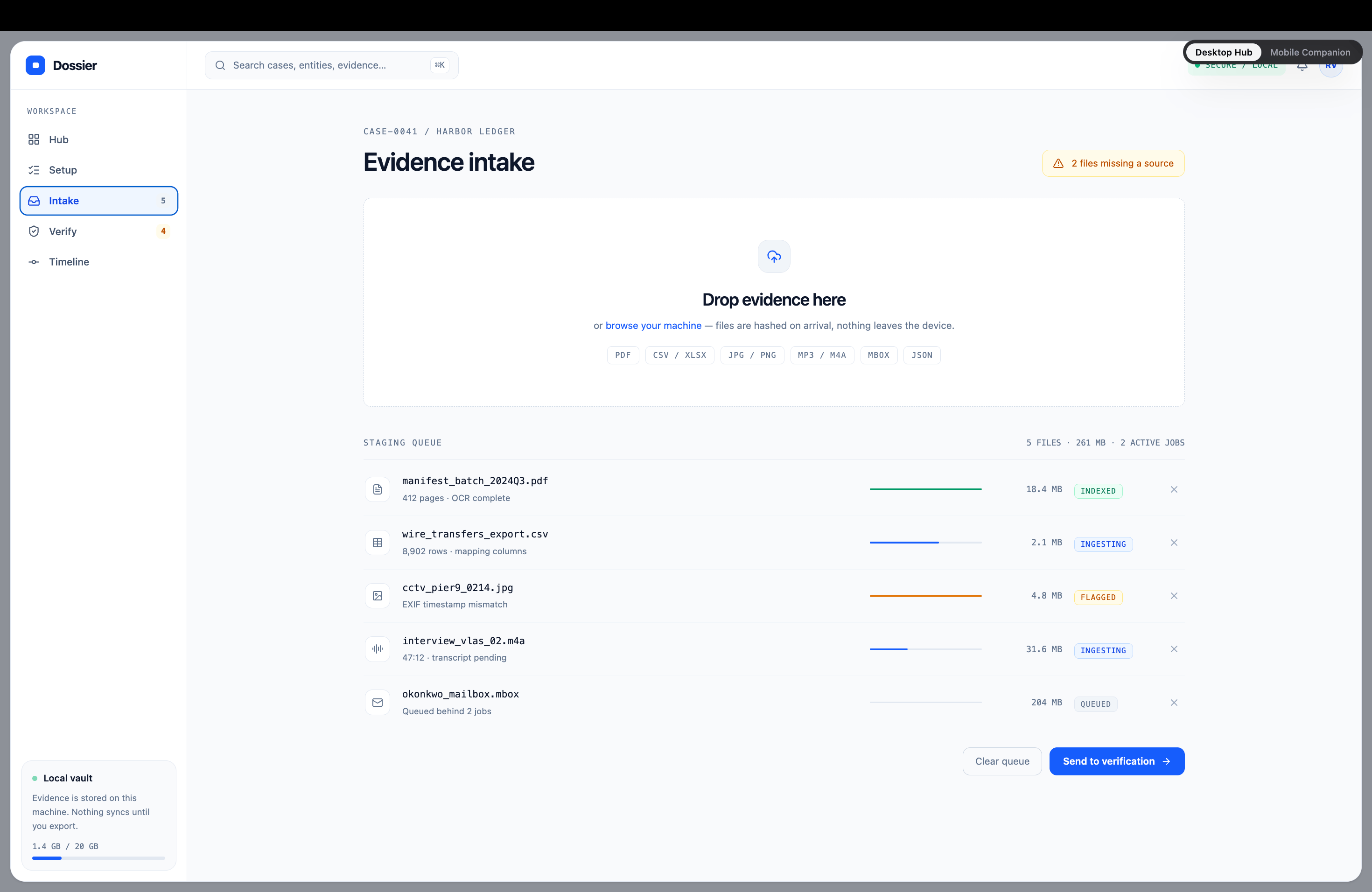
Manual file triage is where investigative momentum stalls. Raw evidentiary assets arrive in incompatible formats (manifests, call records, surveillance stills, and wire exports) that demand hours of manual transcription before cross-referencing can begin. The ingestion pipeline automates file verification and OCR indexing while keeping human analysts firmly in control of the verification loop.
Interaction Model
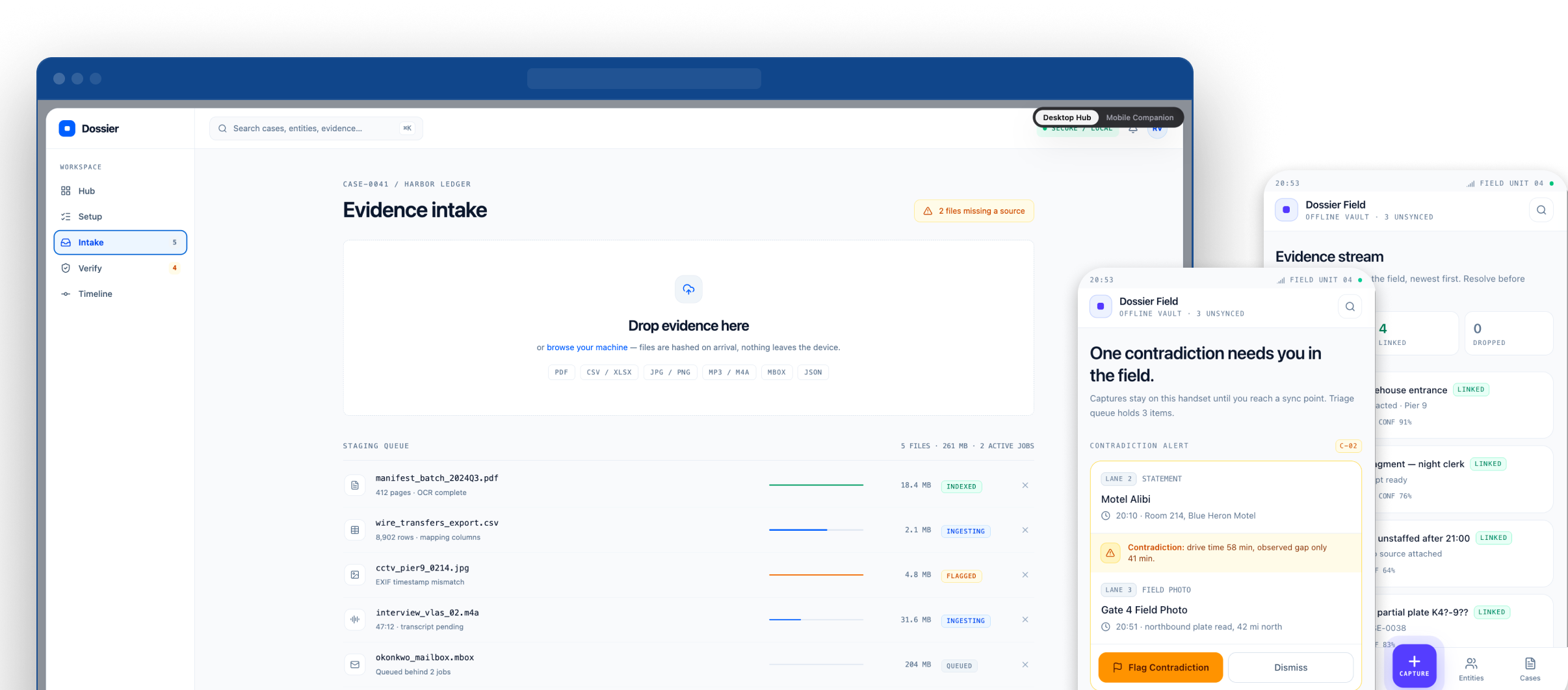
Users drag heterogeneous files directly into an active staging queue. The system immediately calculates local cryptographic checksums to preserve chain of custody, runs inline OCR indexing on documents, and flags metadata mismatches (e.g., EXIF discrepancies). Color-coded progress indicators (Indexed, Ingesting, Flagged) provide instant status visibility, letting analysts send clean batches directly to the verification matrix with a single click.
Temporal-Spatial Contradiction Engine & Alibi Reconciliation
Design Rationale
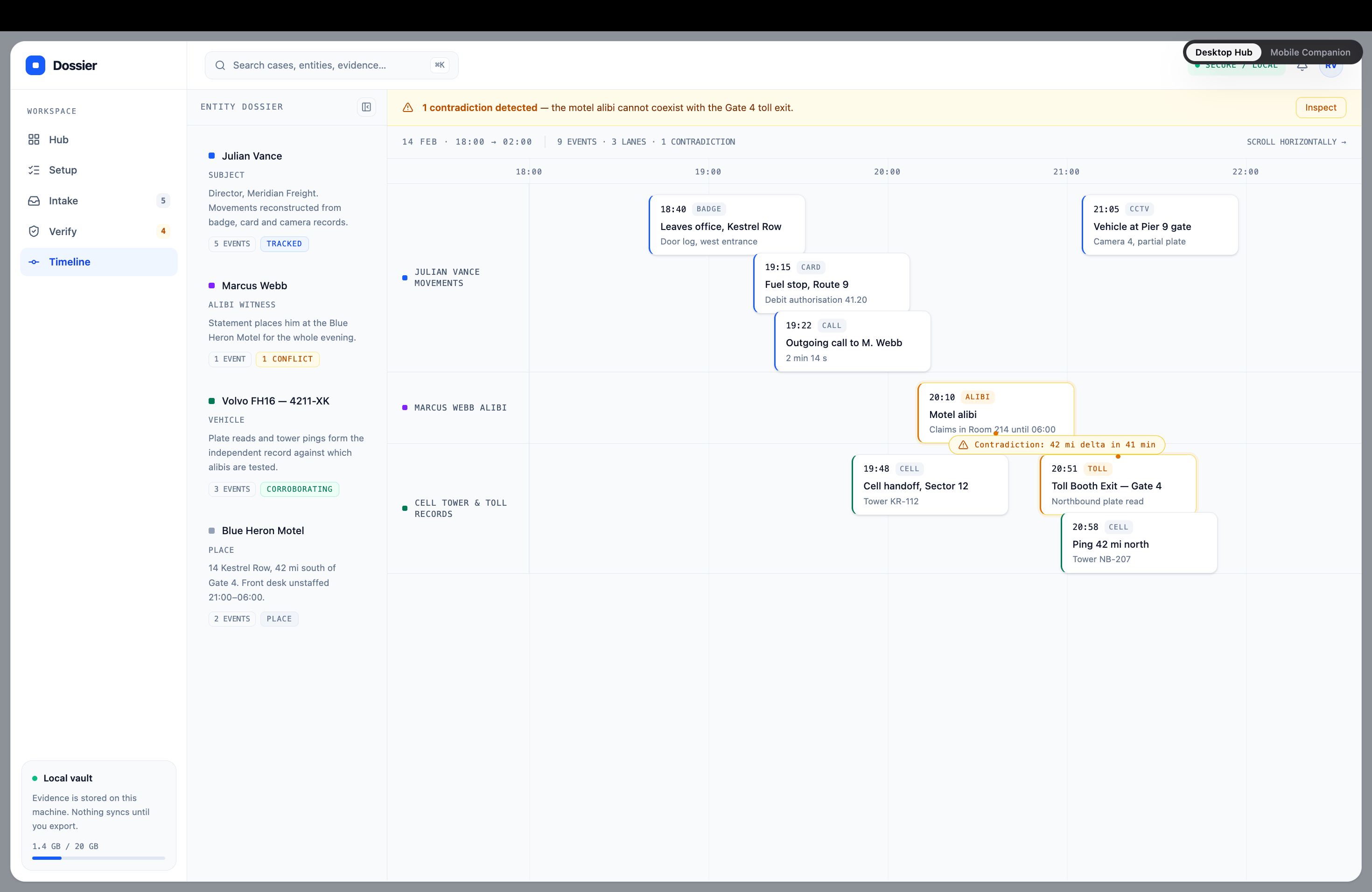
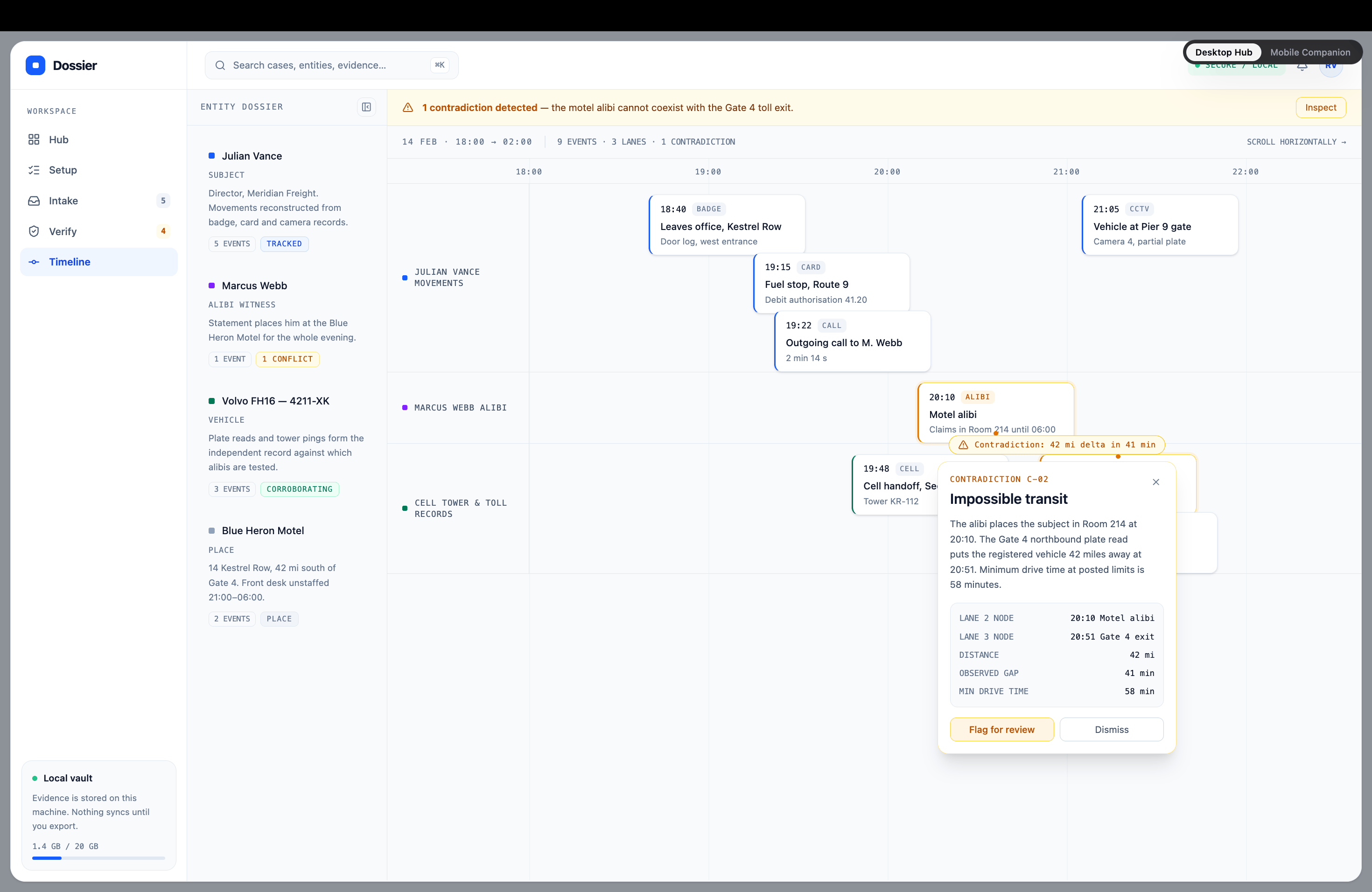
Timeline reconstruction often fails because transit feasibility is computed manually. Investigators must cross-reference alibi statements, toll pings, and cell tower sectors against estimated driving times across fragmented logs. The Contradiction Engine removes manual guesswork by running automated distance-over-time velocity algorithms in the background, treating time and geography as relational coordinates rather than static text entries.
Interaction Model
The multi-lane timeline organizes simultaneous event streams across tracked entities (individuals, vehicles, cell towers). When an entity is logged at two locations within an interval that violates physical transit limits, the system triggers a persistent warning banner and highlights the conflict directly in the swimlane. Selecting the flagged event reveals a contextual contradiction card comparing claimed location against verified physical telemetry (e.g., Gate 4 toll read puts subject 42 miles away; minimum transit time 58 minutes vs. observed gap 41 minutes). Analysts can immediately flag the discrepancy for cross-examination or dismiss it with a verified notation.
FIELD OPERATIONS & RAPID CAPTURE
Deep Dive: Mobile Field Companion App
Desk software assumes reliable connectivity, two hands, and sustained focus. Field investigation demands the opposite: high contrast for outdoor visibility, strict thumb-zone ergonomics for one-handed operation, and immediate automated metadata stamping. The mobile companion focuses on zero-friction capture and on-scene triage, feeding raw intelligence back into the desktop synthesis engine without delay.
Explore the Dossier Mobile App Yourself ↗
Briefing & Field Contradiction Radar
Active surveillance radar surfacing real-time alibi collisions. Field operatives review flagged drive-time discrepancies (e.g., motel statement vs. toll camera capture) with immediate one-tap Flag or Dismiss verification.
Tactical Capture and Instant Transcription
Central pulsing dock trigger opening a bottom sheet for rapid photo capture, OCR plate reading, and 10-second voice memos with animated live waveforms that auto-transcribe directly into case notes.
Field Entity Rolodex & On-Scene Triage
Searchable mobile index categorizing subjects, witnesses, and vehicles. Ambient AI matches newly captured field assets against active case files with clear confidence ratings and one-tap linkage.
Design System & Interaction Polish
Signal Cobalt (#005FFF)
Primary operational triggers, active timeline focus states, and key navigational anchors.
Surface Crisp (#F9FAFC)
Elevated container cards, active staging canvas, and modular dashboard widgets.
Contradiction Amber (#F26900)
Real-time alibi collision flags, pending OCR reviews, and temporal mismatch warnings.
Verified Green (#007C53)
Cryptographic hash confirmation, indexed file status, and verified witness alibis.
Deep Base (#101C32)
Primary typography, high-contrast headings, and grounding navigation docks.
Display & Case Headlines
Plus Jakarta Sans
Case titles, high-level intelligence syntheses, and editorial section kickers.
Technical Telemetry & Identifiers
IBM Plex Mono
Cryptographic SHA-256 hashes, UTC timestamps, GPS coordinates, and file telemetry chips.
UI Controls & Narrative Scannability
Inter
High-density data tables, form inputs, status badges, and rapid-scan field body copy.
How it was made
How It Was Made and Modern AI-Assisted Tooling
To move beyond static screens and validate complex temporal interactions, Dossier was engineered as a high-fidelity, interactive web application. By pairing product design systems thinking with an AI-accelerated engineering stack, the transition from architectural concept to live production prototype took days rather than months.
Figma Systems
IA, Tokens, UI
—→
Cursor + LLMs
React + Tailwind
—→
Vercel CI/CD
Live Production
The Modern Product Design Stack
PROGRAM
Figma
IA & COMPONENT ATOMICS
Component atomics, responsive breakpoint auto-layouts, dark/light token mapping, and multi-surface interaction state flows.
Claude (Anthropic)
Generative UI logic partner
Architected modular React component logic, state machine transitions, and realistic investigative data generators (OCR logs, SHA-256 hashes).
Cursor IDE
AI-ASSISTED DEVELOPMENT
Refactored complex multi-pane layouts, eliminated CSS layout thrashing, and enforced strict TypeScript typing across desktop and mobile surfaces.
React 19 & Vite
FRONTEND ARCHITECTURE
Single unified container orchestrating two ergonomic surfaces (DesktopApp vs. MobileApp) with instant HMR and 60fps waveform animations.
Tailwind CSS
Design token system
Systematic token palette mapping analytical slate canvases, tactical dark mobile views, and WCAG AA-compliant contradiction alerts.
Lucide React
Iconography system
Scalable tactical glyphs calibrated for rapid glanceability across high-density desktop tables and thumb-friendly mobile action sheets.
Vercel CLI
Deployment pipeline
Automated production pipeline providing instant global edge deployments, custom production aliases, and responsive staging URLs.
How it was made
Engineering and Prototyping Decisions
Unified Multi-Surface Architecture
Rather than decoupling desktop and mobile into isolated codebases, Dossier is engineered as a single orchestrator inside App.tsx. A global system switcher toggles between DesktopApp.tsx and MobileApp.tsx while sharing a common state and asset model. This architectural choice lets stakeholders evaluate both ergonomic contexts instantly in-browser without state synchronization drift.
Tactical Viewport Constraints
The mobile companion is framed within a strict max-w-md smartphone boundary, complete with native bezel geometry, dynamic safe areas, and home indicators. Enforcing physical viewport constraints within the browser ensured bottom sheets, thumb-driven radial touch targets, and fixed floating docks were evaluated against actual hand-reach heatmaps rather than stretched desktop viewports.
Production-Fidelity State Simulation
To validate usability under authentic stress, the interface bypasses static placeholder text in favor of stateful, real-time feedback loops:
- Dynamic Waveforms: Procedural 10-second timers coupled with animated SVG audio visualizers for voice dictation.
- Automated Telemetry: Real-time client-side generation of SHA-256 cryptographic hashes, UTC timestamps, and GPS coordinates at capture.
- Optimistic UI Triage: Interactive state queues that update case evidence streams and entity indices immediately upon confirmation.

ALL PROJECTS
CASE STUDY · ENTERPRISE INVESTIGATIVE PLATFORM · 2026
Dossier — End-to-End Intelligence Synthesis and Field Evidence Capture
ROLE
Lead Product Designer (Design Systems & Prototyping)
Domain
Law Enforcement, OSINT & Investigative Tech
Platform
Web Application (Desktop Analytical Hub + Mobile Companion)
Deliverables
Information Architecture, Systems Design, AI Interaction Model, Functional React Prototype
Impact & Performance Signals
< 60s Evidence Triage
Reduced unorganized media ingestion, transcription, and entity tagging from multi-hour manual logging to rapid triage.
Automated Conflict Detection
Replaced manual alibi reconciliation with active temporal-spatial conflict warnings and transit-time validation.
Hardware-Level Integrity
Embedded client-side SHA-256 cryptographic hashing and automated EXIF/GPS coordinate stamps at the point of capture.
PROBLEM STATEMENT & MOTIVATION
Project Background and The "Why"
Complex investigations generate staggering volumes of disjointed data: dispatch notes, audio interviews, physical evidence photos, surveillance footage, and handwritten tips. Currently, investigators, OSINT researchers, and missing-persons teams rely on a patchwork of consumer tools (spreadsheets, cloud drives, pinboards, voice memos).
01
Contradiction Blindspots
Critical timeline conflicts get buried because transit times and alibi intervals are calculated manually across disconnected files.
02
Field-to-Desk Latency
Field observations lag analytical review by hours or days, causing active leads and scene details to go cold.
03
Evidentiary Degradation
Chain of custody erodes when photographic and audio assets lack automated cryptographic verification and hardware-level telemetry at capture.
Having followed open-source intelligence methodologies and investigative workflows for years, a persistent operational gap became clear: civilian researchers, volunteer advocacy groups, and cold case teams were attempting to solve complex, high-stakes cases using fractured consumer apps. Most software in this domain acts as passive data storage. Dossier was designed around a different premise: modern investigative tools should actively perform the heavy cognitive lifting by surfacing temporal contradictions automatically and transforming unstructured field observations into verified, relational intelligence the moment they are recorded.
PRODUCT ARCHITECTURE & SYSTEMS STRATEGY
Core Strategic Architecture: The Dual-Surface System
Investigative work operates across two diametrically opposed environments: high-focus analytical synthesis in the office, and high-tempo, low-dexterity capture in the field. Attempting to solve both with a single responsive desktop web layout compromises both experiences. Dossier is deliberately built as two specialized surfaces powered by a single continuous data model.
SYNTHESIS SURFACE · BROWSER
The Desktop Analytical Hub:
Target User: Analysts, lead detectives, and forensic researchers
Primary Objective: High-density cross-referencing and contradiction analysis
Core Interactions: Multi-pane entity mapping, bulk media staging queue, temporal timeline scrubbing, and evidentiary auditing.
Ergonomic Focus: Keyboard shortcuts, dense data visibility, and wide multi-column layouts.
CAPTURE SURFACE · MOBILE WEB / PWA
The Desktop Analytical Hub:
Target User: Analysts, lead detectives, and forensic researchers
Primary Objective: High-density cross-referencing and contradiction analysis
Core Interactions: Multi-pane entity mapping, bulk media staging queue, temporal timeline scrubbing, and evidentiary auditing.
Ergonomic Focus: Keyboard shortcuts, dense data visibility, and wide multi-column layouts.
Key Features & Design Decisions
Deep Dive: Desktop Analytical Hub
Designed for high cognitive clarity, systematic audit trails, and multi-stream timeline analysis.
Explore the Dossier Hub Yourself ↗
Workspace Hub & Multi-Case Synthesis
Design Rationale
Investigative teams juggle multiple concurrent operations where leads develop non-linearly. Traditional directory structures hide operational velocity, forcing analysts to manually check whether a case has gone stale or received fresh evidence. The Workspace Hub acts as an operational radar, exposing open contradiction counts, active entity density, and local vault security states before diving into a specific dossier.
Interaction Model
The dashboard organizes active, review-stage, and cold cases into dense status cards. Analysts can scan key metrics at a glance, such as pending contradiction flags, newly indexed files, and last-activity timestamps. Primary actions prioritize frictionless entry via New Case creation or one-click Import Dossier ingestion, while the persistent local-vault monitor confirms zero cloud leakage for sensitive casework.
Evidence Ingestion & Entity Extraction
Design Rationale
Manual file triage is where investigative momentum stalls. Raw evidentiary assets arrive in incompatible formats (manifests, call records, surveillance stills, and wire exports) that demand hours of manual transcription before cross-referencing can begin. The ingestion pipeline automates file verification and OCR indexing while keeping human analysts firmly in control of the verification loop.
Interaction Model
Users drag heterogeneous files directly into an active staging queue. The system immediately calculates local cryptographic checksums to preserve chain of custody, runs inline OCR indexing on documents, and flags metadata mismatches (e.g., EXIF discrepancies). Color-coded progress indicators (Indexed, Ingesting, Flagged) provide instant status visibility, letting analysts send clean batches directly to the verification matrix with a single click.
Temporal-Spatial Contradiction Engine & Alibi Reconciliation
Design Rationale
Timeline reconstruction often fails because transit feasibility is computed manually. Investigators must cross-reference alibi statements, toll pings, and cell tower sectors against estimated driving times across fragmented logs. The Contradiction Engine removes manual guesswork by running automated distance-over-time velocity algorithms in the background, treating time and geography as relational coordinates rather than static text entries.
Interaction Model
The multi-lane timeline organizes simultaneous event streams across tracked entities (individuals, vehicles, cell towers). When an entity is logged at two locations within an interval that violates physical transit limits, the system triggers a persistent warning banner and highlights the conflict directly in the swimlane. Selecting the flagged event reveals a contextual contradiction card comparing claimed location against verified physical telemetry (e.g., Gate 4 toll read puts subject 42 miles away; minimum transit time 58 minutes vs. observed gap 41 minutes). Analysts can immediately flag the discrepancy for cross-examination or dismiss it with a verified notation.
FIELD OPERATIONS & RAPID CAPTURE
Deep Dive: Mobile Field Companion App
Desk software assumes reliable connectivity, two hands, and sustained focus. Field investigation demands the opposite: high contrast for outdoor visibility, strict thumb-zone ergonomics for one-handed operation, and immediate automated metadata stamping. The mobile companion focuses on zero-friction capture and on-scene triage, feeding raw intelligence back into the desktop synthesis engine without delay.
Explore the Dossier Mobile App Yourself ↗
Briefing & Field Contradiction Radar
Active surveillance radar surfacing real-time alibi collisions. Field operatives review flagged drive-time discrepancies (e.g., motel statement vs. toll camera capture) with immediate one-tap Flag or Dismiss verification.
Tactical Capture and Instant Transcription
Central pulsing dock trigger opening a bottom sheet for rapid photo capture, OCR plate reading, and 10-second voice memos with animated live waveforms that auto-transcribe directly into case notes.
Field Entity Rolodex & On-Scene Triage
Searchable mobile index categorizing subjects, witnesses, and vehicles. Ambient AI matches newly captured field assets against active case files with clear confidence ratings and one-tap linkage.
Design System & Interaction Polish
Signal Cobalt (#005FFF)
Primary operational triggers, active timeline focus states, and key navigational anchors.
Surface Crisp (#F9FAFC)
Elevated container cards, active staging canvas, and modular dashboard widgets.
Contradiction Amber (#F26900)
Real-time alibi collision flags, pending OCR reviews, and temporal mismatch warnings.
Verified Green (#007C53)
Cryptographic hash confirmation, indexed file status, and verified witness alibis.
Deep Base (#101C32)
Primary typography, high-contrast headings, and grounding navigation docks.
Display & Case Headlines
Plus Jakarta Sans
Case titles, high-level intelligence syntheses, and editorial section kickers.
Technical Telemetry & Identifiers
IBM Plex Mono
Cryptographic SHA-256 hashes, UTC timestamps, GPS coordinates, and file telemetry chips.
UI Controls & Narrative Scannability
Inter
High-density data tables, form inputs, status badges, and rapid-scan field body copy.
How it was made
How It Was Made and Modern AI-Assisted Tooling
To move beyond static screens and validate complex temporal interactions, Dossier was engineered as a high-fidelity, interactive web application. By pairing product design systems thinking with an AI-accelerated engineering stack, the transition from architectural concept to live production prototype took days rather than months.
Figma Systems
IA, Tokens, UI
—→
Cursor + LLMs
React + Tailwind
—→
Vercel CI/CD
Live Production
The Modern Product Design Stack
PROGRAM
Figma
IA & COMPONENT ATOMICS
Component atomics, responsive breakpoint auto-layouts, dark/light token mapping, and multi-surface interaction state flows.
Claude (Anthropic)
Generative UI logic partner
Architected modular React component logic, state machine transitions, and realistic investigative data generators (OCR logs, SHA-256 hashes).
Cursor IDE
AI-ASSISTED DEVELOPMENT
Refactored complex multi-pane layouts, eliminated CSS layout thrashing, and enforced strict TypeScript typing across desktop and mobile surfaces.
React 19 & Vite
FRONTEND ARCHITECTURE
Single unified container orchestrating two ergonomic surfaces (DesktopApp vs. MobileApp) with instant HMR and 60fps waveform animations.
Tailwind CSS
Design token system
Systematic token palette mapping analytical slate canvases, tactical dark mobile views, and WCAG AA-compliant contradiction alerts.
Lucide React
Iconography system
Scalable tactical glyphs calibrated for rapid glanceability across high-density desktop tables and thumb-friendly mobile action sheets.
Vercel CLI
Deployment pipeline
Automated production pipeline providing instant global edge deployments, custom production aliases, and responsive staging URLs.
How it was made
Engineering and Prototyping Decisions
Unified Multi-Surface Architecture
Rather than decoupling desktop and mobile into isolated codebases, Dossier is engineered as a single orchestrator inside App.tsx. A global system switcher toggles between DesktopApp.tsx and MobileApp.tsx while sharing a common state and asset model. This architectural choice lets stakeholders evaluate both ergonomic contexts instantly in-browser without state synchronization drift.
Tactical Viewport Constraints
The mobile companion is framed within a strict max-w-md smartphone boundary, complete with native bezel geometry, dynamic safe areas, and home indicators. Enforcing physical viewport constraints within the browser ensured bottom sheets, thumb-driven radial touch targets, and fixed floating docks were evaluated against actual hand-reach heatmaps rather than stretched desktop viewports.
Production-Fidelity State Simulation
To validate usability under authentic stress, the interface bypasses static placeholder text in favor of stateful, real-time feedback loops:
- Dynamic Waveforms: Procedural 10-second timers coupled with animated SVG audio visualizers for voice dictation.
- Automated Telemetry: Real-time client-side generation of SHA-256 cryptographic hashes, UTC timestamps, and GPS coordinates at capture.
- Optimistic UI Triage: Interactive state queues that update case evidence streams and entity indices immediately upon confirmation.

Sheila Sczepanik
Senior Product Designer
Specializing in enterprise tools, multi-brand design systems, and complex data-dense workflows that scale effortlessly for engineering teams.
ALL PROJECTS
CASE STUDY · ENTERPRISE INVESTIGATIVE PLATFORM · 2026
Dossier — End-to-End Intelligence Synthesis and Field Evidence Capture
ROLE
Lead Product Designer (Design Systems & Prototyping)
Domain
Law Enforcement, OSINT & Investigative Tech
Platform
Web Application (Desktop Analytical Hub + Mobile Companion)
Deliverables
Information Architecture, Systems Design, AI Interaction Model, Functional React Prototype
Impact & Performance Signals
< 60s Evidence Triage
Reduced unorganized media ingestion, transcription, and entity tagging from multi-hour manual logging to rapid triage.
Automated Conflict Detection
Replaced manual alibi reconciliation with active temporal-spatial conflict warnings and transit-time validation.
Hardware-Level Integrity
Embedded client-side SHA-256 cryptographic hashing and automated EXIF/GPS coordinate stamps at the point of capture.
PROBLEM STATEMENT & MOTIVATION
Project Background and The "Why"
Complex investigations generate staggering volumes of disjointed data: dispatch notes, audio interviews, physical evidence photos, surveillance footage, and handwritten tips. Currently, investigators, OSINT researchers, and missing-persons teams rely on a patchwork of consumer tools (spreadsheets, cloud drives, pinboards, voice memos).
01
Contradiction Blindspots
Critical timeline conflicts get buried because transit times and alibi intervals are calculated manually across disconnected files.
02
Field-to-Desk Latency
Field observations lag analytical review by hours or days, causing active leads and scene details to go cold.
03
Evidentiary Degradation
Chain of custody erodes when photographic and audio assets lack automated cryptographic verification and hardware-level telemetry at capture.
Having followed open-source intelligence methodologies and investigative workflows for years, a persistent operational gap became clear: civilian researchers, volunteer advocacy groups, and cold case teams were attempting to solve complex, high-stakes cases using fractured consumer apps. Most software in this domain acts as passive data storage. Dossier was designed around a different premise: modern investigative tools should actively perform the heavy cognitive lifting by surfacing temporal contradictions automatically and transforming unstructured field observations into verified, relational intelligence the moment they are recorded.
PRODUCT ARCHITECTURE & SYSTEMS STRATEGY
Core Strategic Architecture: The Dual-Surface System
Investigative work operates across two diametrically opposed environments: high-focus analytical synthesis in the office, and high-tempo, low-dexterity capture in the field. Attempting to solve both with a single responsive desktop web layout compromises both experiences. Dossier is deliberately built as two specialized surfaces powered by a single continuous data model.
SYNTHESIS SURFACE · BROWSER
The Desktop Analytical Hub:
Target User: Analysts, lead detectives, and forensic researchers
Primary Objective: High-density cross-referencing and contradiction analysis
Core Interactions: Multi-pane entity mapping, bulk media staging queue, temporal timeline scrubbing, and evidentiary auditing.
Ergonomic Focus: Keyboard shortcuts, dense data visibility, and wide multi-column layouts.
CAPTURE SURFACE · MOBILE WEB / PWA
The Desktop Analytical Hub:
Target User: Analysts, lead detectives, and forensic researchers
Primary Objective: High-density cross-referencing and contradiction analysis
Core Interactions: Multi-pane entity mapping, bulk media staging queue, temporal timeline scrubbing, and evidentiary auditing.
Ergonomic Focus: Keyboard shortcuts, dense data visibility, and wide multi-column layouts.
Key Features & Design Decisions
Deep Dive: Desktop Analytical Hub
Designed for high cognitive clarity, systematic audit trails, and multi-stream timeline analysis.
Explore the Dossier Hub Yourself ↗
Workspace Hub & Multi-Case Synthesis
Design Rationale
Investigative teams juggle multiple concurrent operations where leads develop non-linearly. Traditional directory structures hide operational velocity, forcing analysts to manually check whether a case has gone stale or received fresh evidence. The Workspace Hub acts as an operational radar, exposing open contradiction counts, active entity density, and local vault security states before diving into a specific dossier.
Interaction Model
The dashboard organizes active, review-stage, and cold cases into dense status cards. Analysts can scan key metrics at a glance, such as pending contradiction flags, newly indexed files, and last-activity timestamps. Primary actions prioritize frictionless entry via New Case creation or one-click Import Dossier ingestion, while the persistent local-vault monitor confirms zero cloud leakage for sensitive casework.
Evidence Ingestion & Entity Extraction
Design Rationale
Manual file triage is where investigative momentum stalls. Raw evidentiary assets arrive in incompatible formats (manifests, call records, surveillance stills, and wire exports) that demand hours of manual transcription before cross-referencing can begin. The ingestion pipeline automates file verification and OCR indexing while keeping human analysts firmly in control of the verification loop.
Interaction Model
Users drag heterogeneous files directly into an active staging queue. The system immediately calculates local cryptographic checksums to preserve chain of custody, runs inline OCR indexing on documents, and flags metadata mismatches (e.g., EXIF discrepancies). Color-coded progress indicators (Indexed, Ingesting, Flagged) provide instant status visibility, letting analysts send clean batches directly to the verification matrix with a single click.
Temporal-Spatial Contradiction Engine & Alibi Reconciliation
Design Rationale
Timeline reconstruction often fails because transit feasibility is computed manually. Investigators must cross-reference alibi statements, toll pings, and cell tower sectors against estimated driving times across fragmented logs. The Contradiction Engine removes manual guesswork by running automated distance-over-time velocity algorithms in the background, treating time and geography as relational coordinates rather than static text entries.
Interaction Model
The multi-lane timeline organizes simultaneous event streams across tracked entities (individuals, vehicles, cell towers). When an entity is logged at two locations within an interval that violates physical transit limits, the system triggers a persistent warning banner and highlights the conflict directly in the swimlane. Selecting the flagged event reveals a contextual contradiction card comparing claimed location against verified physical telemetry (e.g., Gate 4 toll read puts subject 42 miles away; minimum transit time 58 minutes vs. observed gap 41 minutes). Analysts can immediately flag the discrepancy for cross-examination or dismiss it with a verified notation.
FIELD OPERATIONS & RAPID CAPTURE
Deep Dive: Mobile Field Companion App
Desk software assumes reliable connectivity, two hands, and sustained focus. Field investigation demands the opposite: high contrast for outdoor visibility, strict thumb-zone ergonomics for one-handed operation, and immediate automated metadata stamping. The mobile companion focuses on zero-friction capture and on-scene triage, feeding raw intelligence back into the desktop synthesis engine without delay.
Explore the Dossier Mobile App Yourself ↗
Briefing & Field Contradiction Radar
Active surveillance radar surfacing real-time alibi collisions. Field operatives review flagged drive-time discrepancies (e.g., motel statement vs. toll camera capture) with immediate one-tap Flag or Dismiss verification.
Tactical Capture and Instant Transcription
Central pulsing dock trigger opening a bottom sheet for rapid photo capture, OCR plate reading, and 10-second voice memos with animated live waveforms that auto-transcribe directly into case notes.
Field Entity Rolodex & On-Scene Triage
Searchable mobile index categorizing subjects, witnesses, and vehicles. Ambient AI matches newly captured field assets against active case files with clear confidence ratings and one-tap linkage.
hoosierlottery.com/who-we-are/

Page 04
About Us & Giving Back
Dedicated civic trust hub highlighting state pension funding, teacher retirement support, and local community reinvestment.
See Live
Design System & Interaction Polish
Signal Cobalt (#005FFF)
Primary operational triggers, active timeline focus states, and key navigational anchors.
Surface Crisp (#F9FAFC)
Elevated container cards, active staging canvas, and modular dashboard widgets.
Contradiction Amber (#F26900)
Real-time alibi collision flags, pending OCR reviews, and temporal mismatch warnings.
Verified Green (#007C53)
Cryptographic hash confirmation, indexed file status, and verified witness alibis.
Deep Base (#101C32)
Primary typography, high-contrast headings, and grounding navigation docks.
Display & Case Headlines
Plus Jakarta Sans
Case titles, high-level intelligence syntheses, and editorial section kickers.
Technical Telemetry & Identifiers
IBM Plex Mono
Cryptographic SHA-256 hashes, UTC timestamps, GPS coordinates, and file telemetry chips.
UI Controls & Narrative Scannability
Inter
High-density data tables, form inputs, status badges, and rapid-scan field body copy.
How it was made
How It Was Made and Modern AI-Assisted Tooling
To move beyond static screens and validate complex temporal interactions, Dossier was engineered as a high-fidelity, interactive web application. By pairing product design systems thinking with an AI-accelerated engineering stack, the transition from architectural concept to live production prototype took days rather than months.
Figma Systems
IA, Tokens, UI
—→
Cursor + LLMs
React + Tailwind
—→
Vercel CI/CD
Live Production
The Modern Product Design Stack
PROGRAM
Figma
IA & COMPONENT ATOMICS
Component atomics, responsive breakpoint auto-layouts, dark/light token mapping, and multi-surface interaction state flows.
Claude (Anthropic)
Generative UI logic partner
Architected modular React component logic, state machine transitions, and realistic investigative data generators (OCR logs, SHA-256 hashes).
Cursor IDE
AI-ASSISTED DEVELOPMENT
Refactored complex multi-pane layouts, eliminated CSS layout thrashing, and enforced strict TypeScript typing across desktop and mobile surfaces.
React 19 & Vite
FRONTEND ARCHITECTURE
Single unified container orchestrating two ergonomic surfaces (DesktopApp vs. MobileApp) with instant HMR and 60fps waveform animations.
Tailwind CSS
Design token system
Systematic token palette mapping analytical slate canvases, tactical dark mobile views, and WCAG AA-compliant contradiction alerts.
Lucide React
Iconography system
Scalable tactical glyphs calibrated for rapid glanceability across high-density desktop tables and thumb-friendly mobile action sheets.
Vercel CLI
Deployment pipeline
Automated production pipeline providing instant global edge deployments, custom production aliases, and responsive staging URLs.
How it was made
Engineering and Prototyping Decisions
Unified Multi-Surface Architecture
Rather than decoupling desktop and mobile into isolated codebases, Dossier is engineered as a single orchestrator inside App.tsx. A global system switcher toggles between DesktopApp.tsx and MobileApp.tsx while sharing a common state and asset model. This architectural choice lets stakeholders evaluate both ergonomic contexts instantly in-browser without state synchronization drift.
Tactical Viewport Constraints
The mobile companion is framed within a strict max-w-md smartphone boundary, complete with native bezel geometry, dynamic safe areas, and home indicators. Enforcing physical viewport constraints within the browser ensured bottom sheets, thumb-driven radial touch targets, and fixed floating docks were evaluated against actual hand-reach heatmaps rather than stretched desktop viewports.
Production-Fidelity State Simulation
To validate usability under authentic stress, the interface bypasses static placeholder text in favor of stateful, real-time feedback loops:
- Dynamic Waveforms: Procedural 10-second timers coupled with animated SVG audio visualizers for voice dictation.
- Automated Telemetry: Real-time client-side generation of SHA-256 cryptographic hashes, UTC timestamps, and GPS coordinates at capture.
- Optimistic UI Triage: Interactive state queues that update case evidence streams and entity indices immediately upon confirmation.
Sheila Sczepanik
Senior Product Designer
Specializing in enterprise tools, multi-brand design systems, and complex data-dense workflows that scale effortlessly for engineering teams.