Product Design
·
ZS Associates
·
2022 - Present
ZS Associates
Design System & Product Design
End-to-end component architecture and UI strategy for enterprise SaaS platforms. Owned the creation and rollout of a semantic token framework, standardized accessibility guidelines, and built a scaled component library to unify product experiences across cross-functional engineering teams.
UX Design
Design Systems
Accessibility
Component Library
Figma
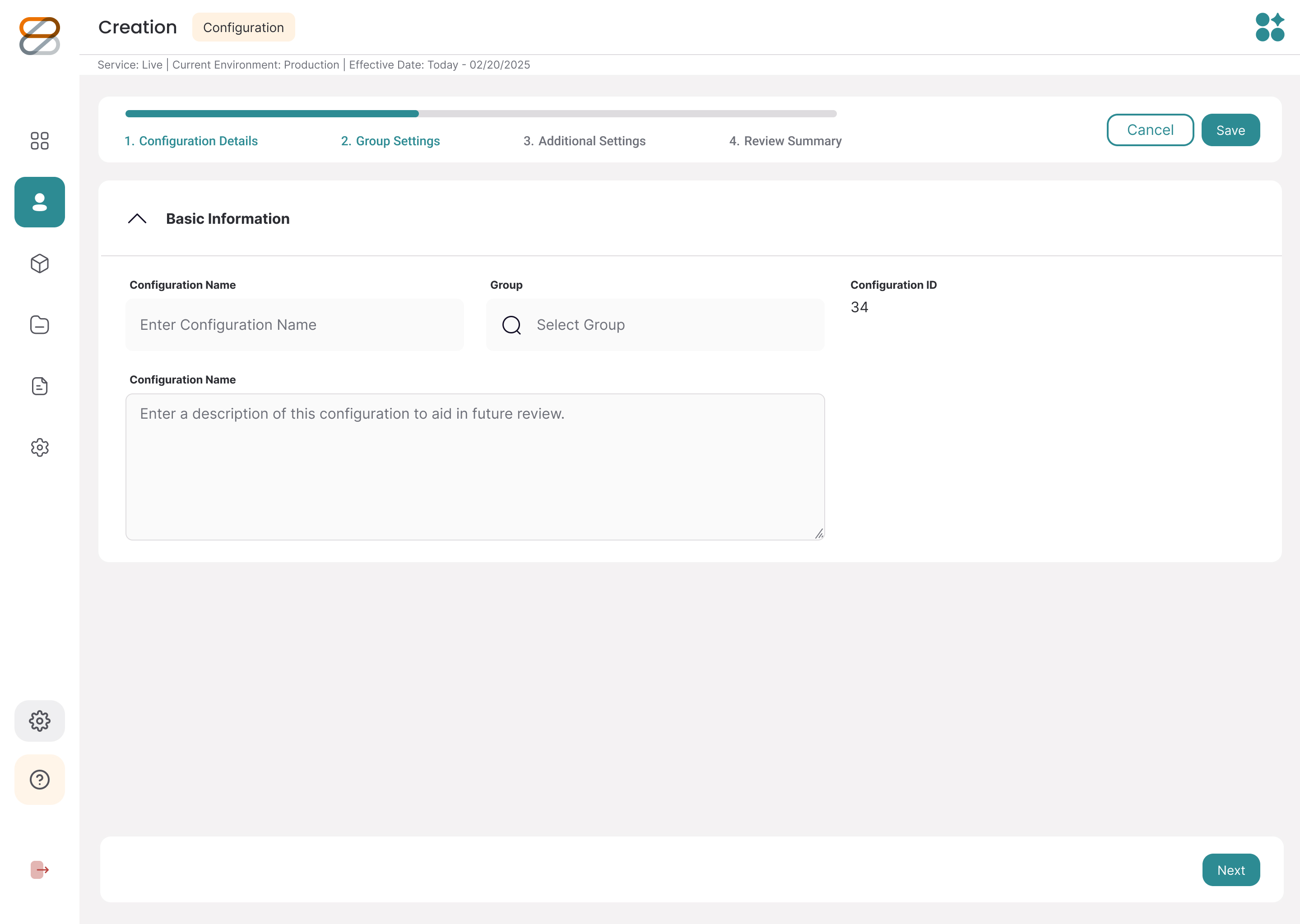
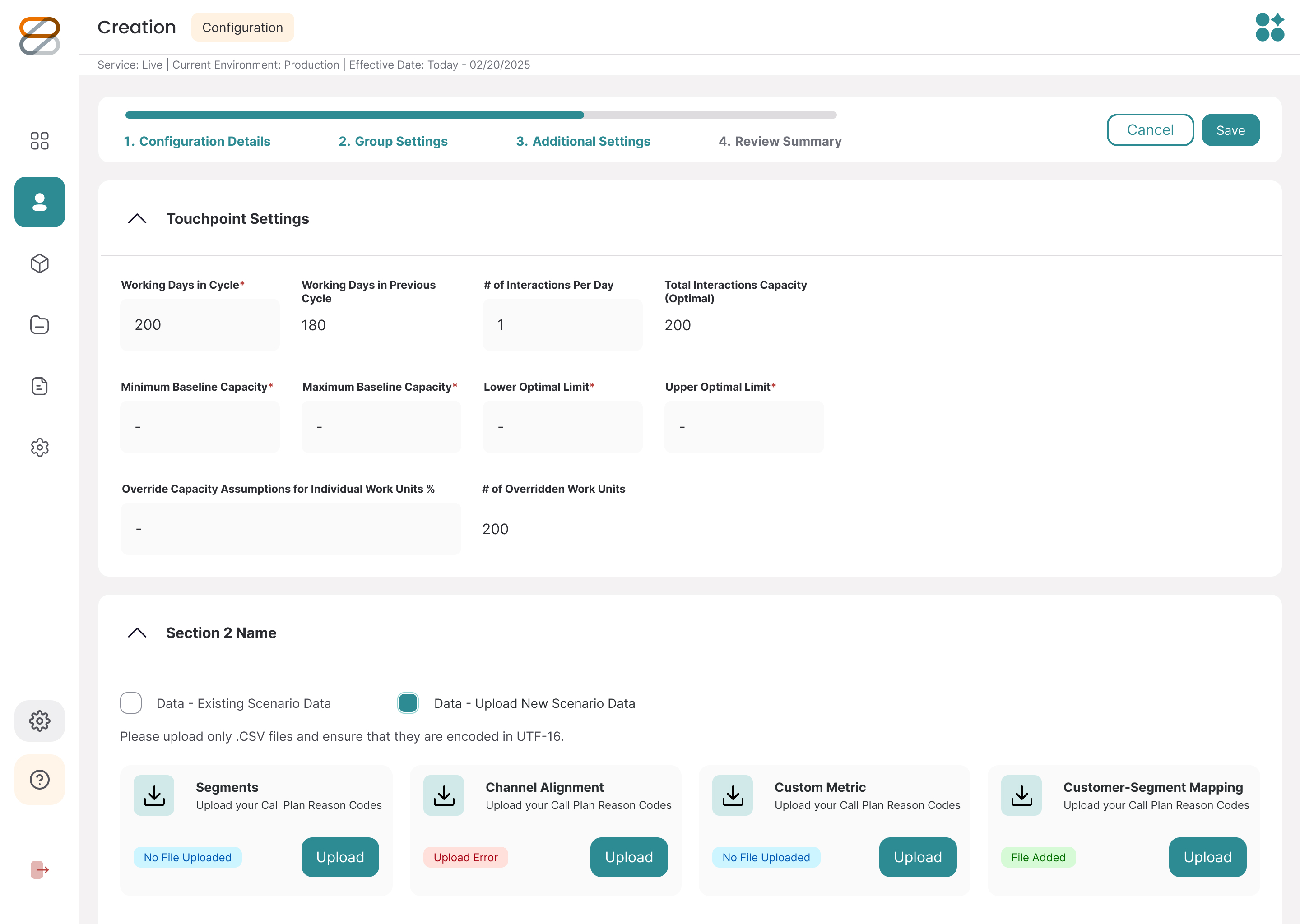
Design approach
Design Systems & UI
I build the visual languages that connect design and development.
System Overhaul: Modernized ZS's core component libraries with semantic design tokens to streamline developer handoff.
Production Speed: Anchored frameworks in strict WCAG accessibility standards to wipe out design debt and boost production speed.
Product Experience
I translate complex, highly ambiguous problems into straightforward UX and UI design.
Iterative Process: Lean into rapid prototyping and testing to pivot quickly whenever an initial hypothesis fails.
Business Value: Balance data-driven strategies with strong visual execution to boost adoption and reduce user churn.
Leadership & Strategy
I bridge the gap between high-level business strategy and everyday design execution.
Cross-Functional Reality: Partner closely with product and engineering to navigate complex lifecycles and build scalable workflows.
Strategic Alignment: Keep design decisions tightly tied to the broader product roadmap to drive measurable business objectives.
DESIGN SYSTEM OPERATIONS & DISCOVERY
Modernizing the component ecosystem
As the design system lead, I audited and revamped our core component architecture to support modern UI patterns, AI-driven workflows, and strict accessibility standards.
Beyond maintaining our daily design system operations, I owned the creation of our semantic token framework and refactored existing UI components into modular, AI-ready assets—ensuring seamless token translation for automated UI generation while baking WCAG AA compliance into every state.
80+
core components modernized
100%
WCAG AA compliant states
Complete
semantic token framework
created
AI-Ready
component architecture
LAYOUT STRATEGY & IA
Architecting complex data density
Before jumping into visual styling, the ream mapped out the structural framework and layout logic for our workflow screens. The goal here was figuring out how to handle heavy data without making the screens feel cluttered, especially across multi-step setup flows and complex team tables.
Getting the layout hierarchy right early helped us iron out tricky interactions—like multi-region assignments and inline status updates—long before building out the high-fidelity component library.
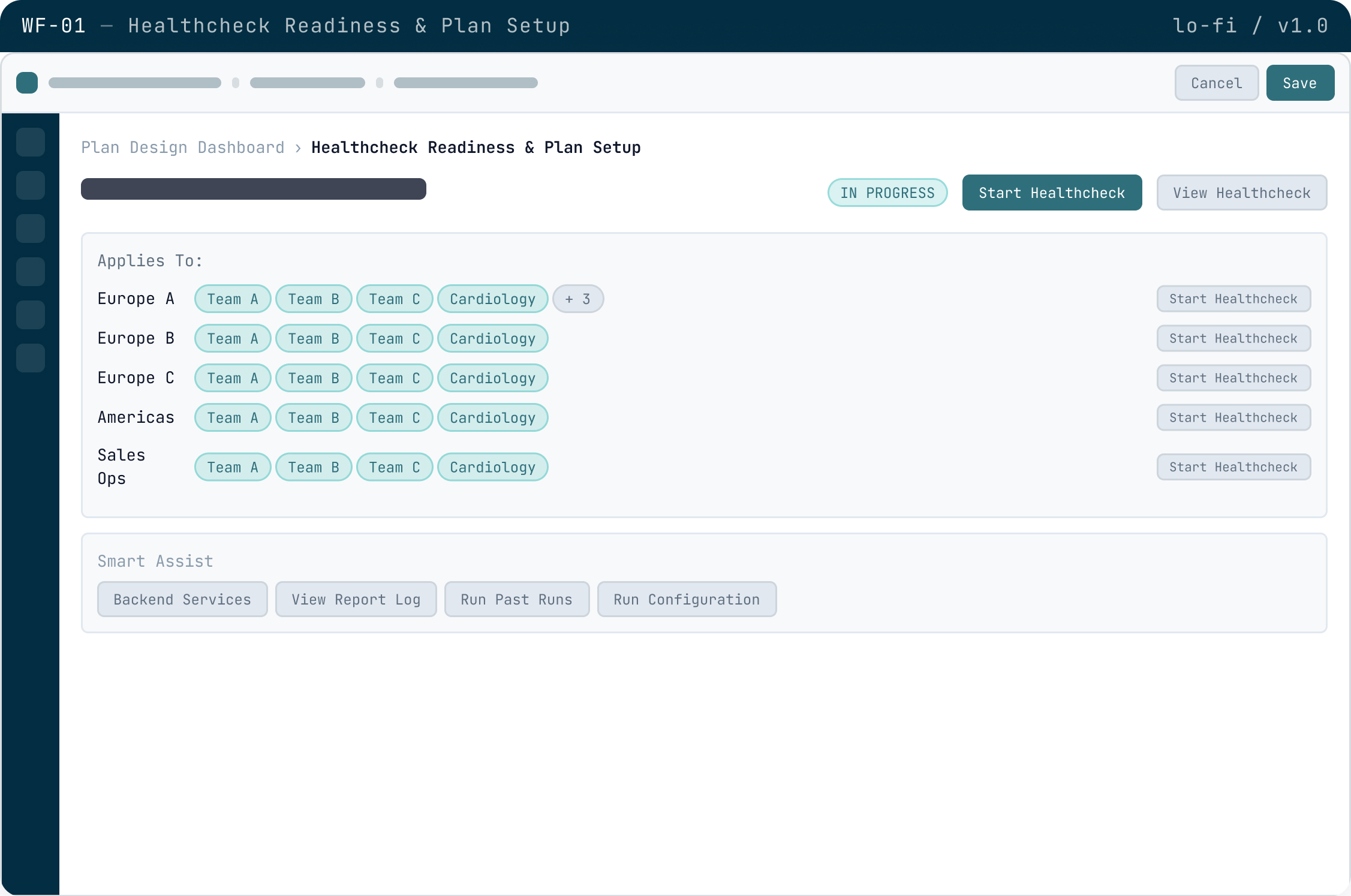
Screen notes
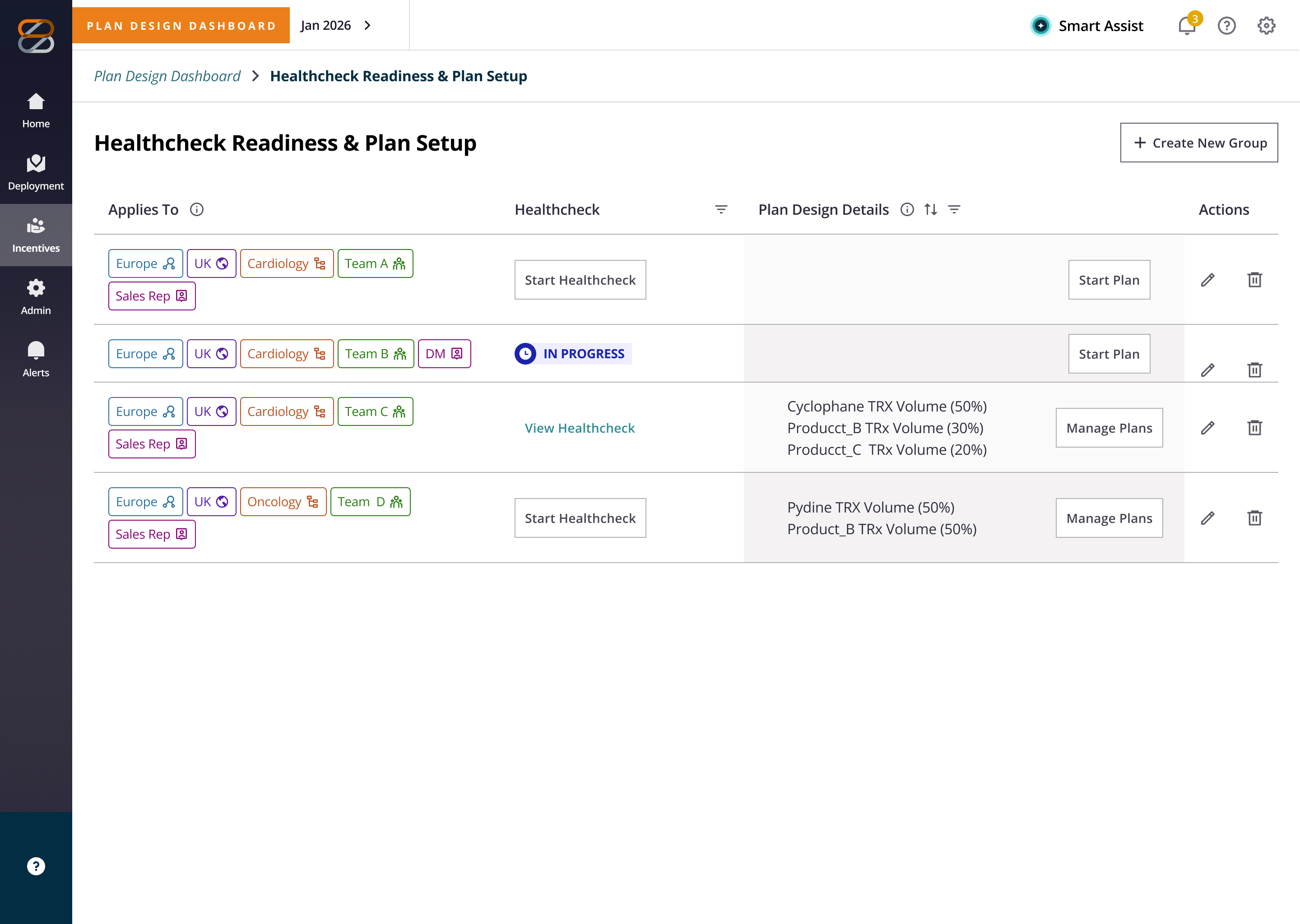
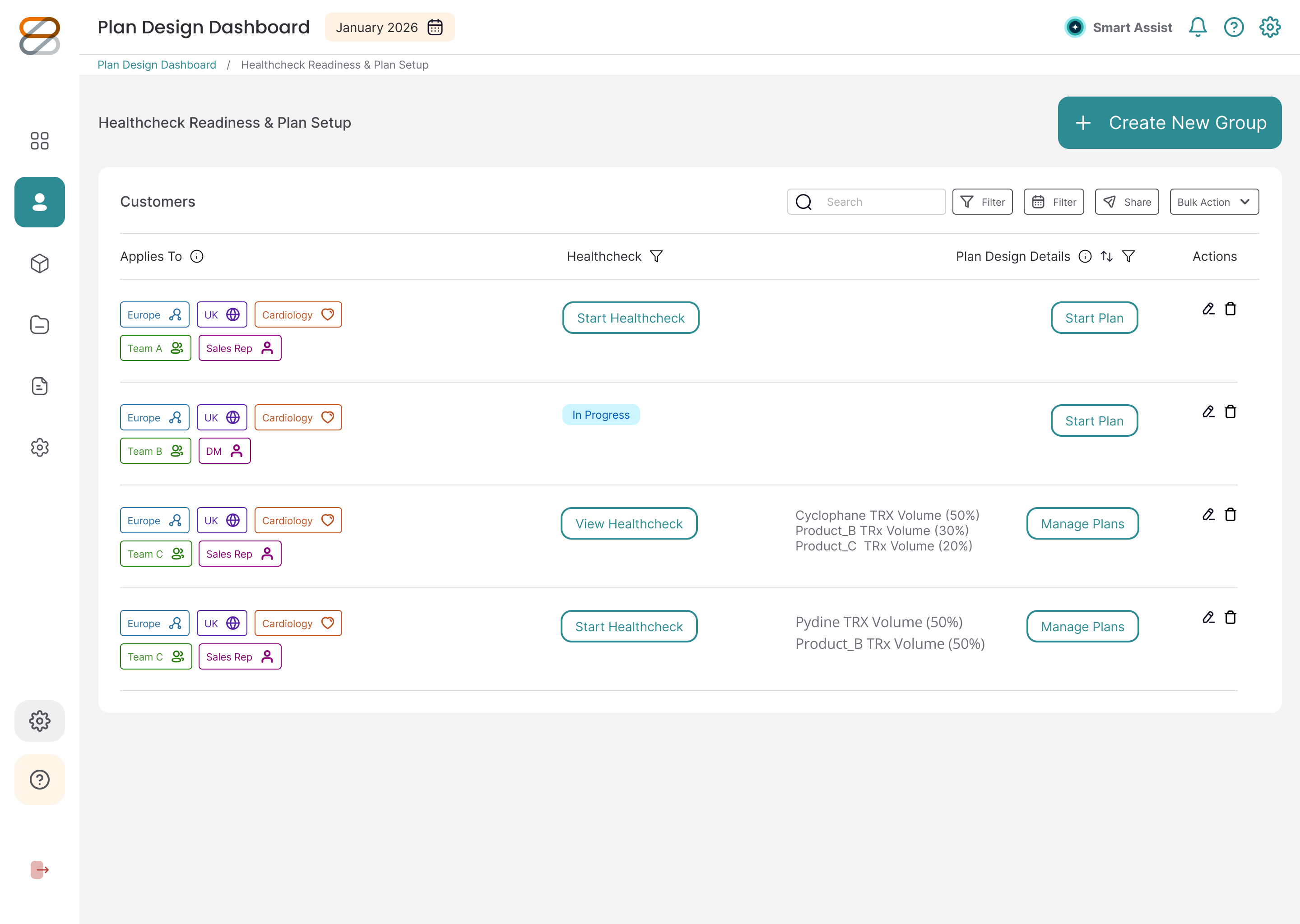
Multi-region team assignment matrix: Organized teams into regional tags so managers can easily run healthchecks for specific locations right from the table row.
Design decisions
Region-scoped team picker: Used clean tagging to keep dense rows from feeling overwhelming.
Inline action buttons: Placed CTA buttons directly next to each region row so the trigger action always makes spatial sense.
Inline status badges: Added clear badges to show progress states without pushing or shifting the table layout.
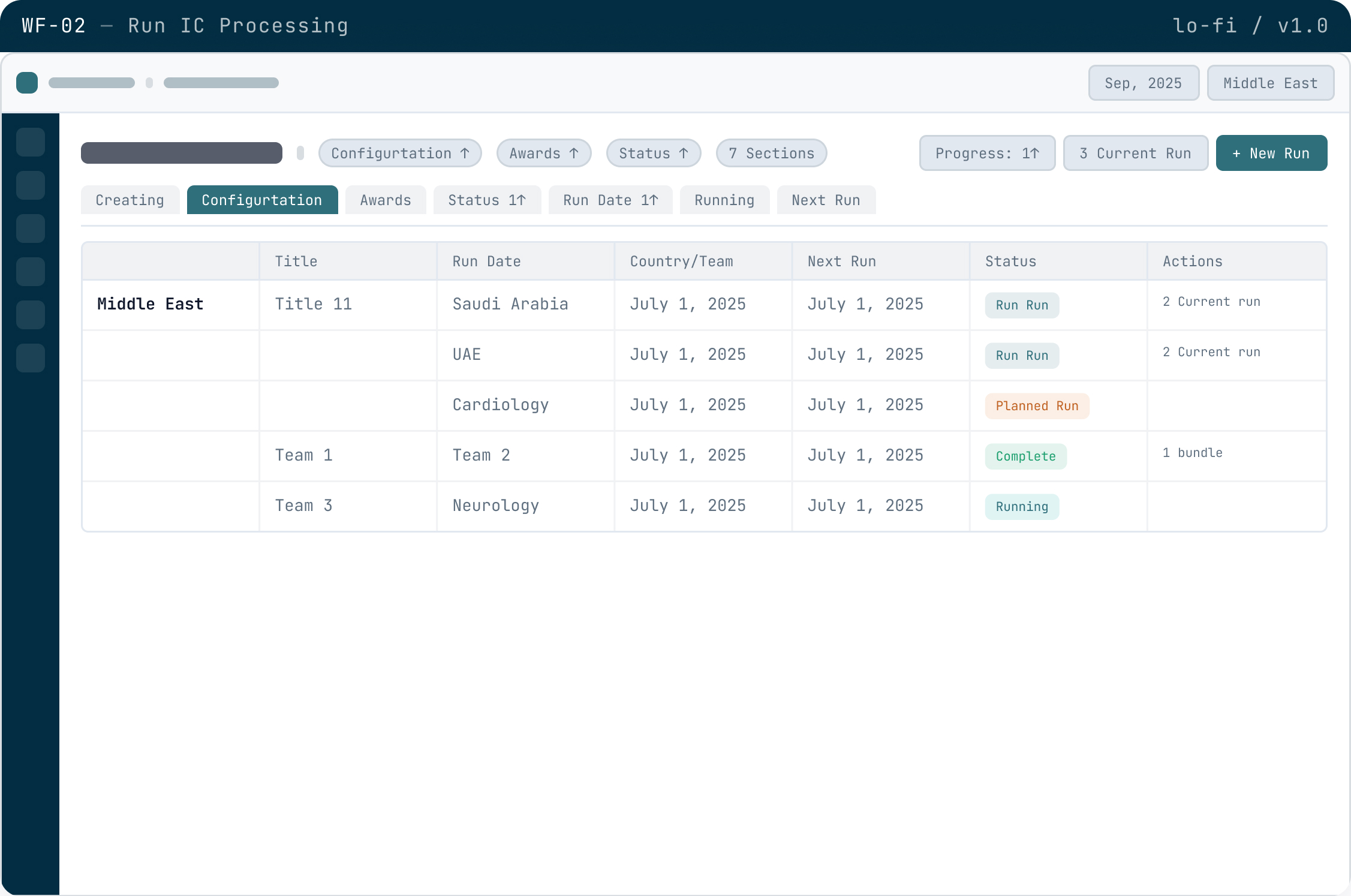
Screen notes
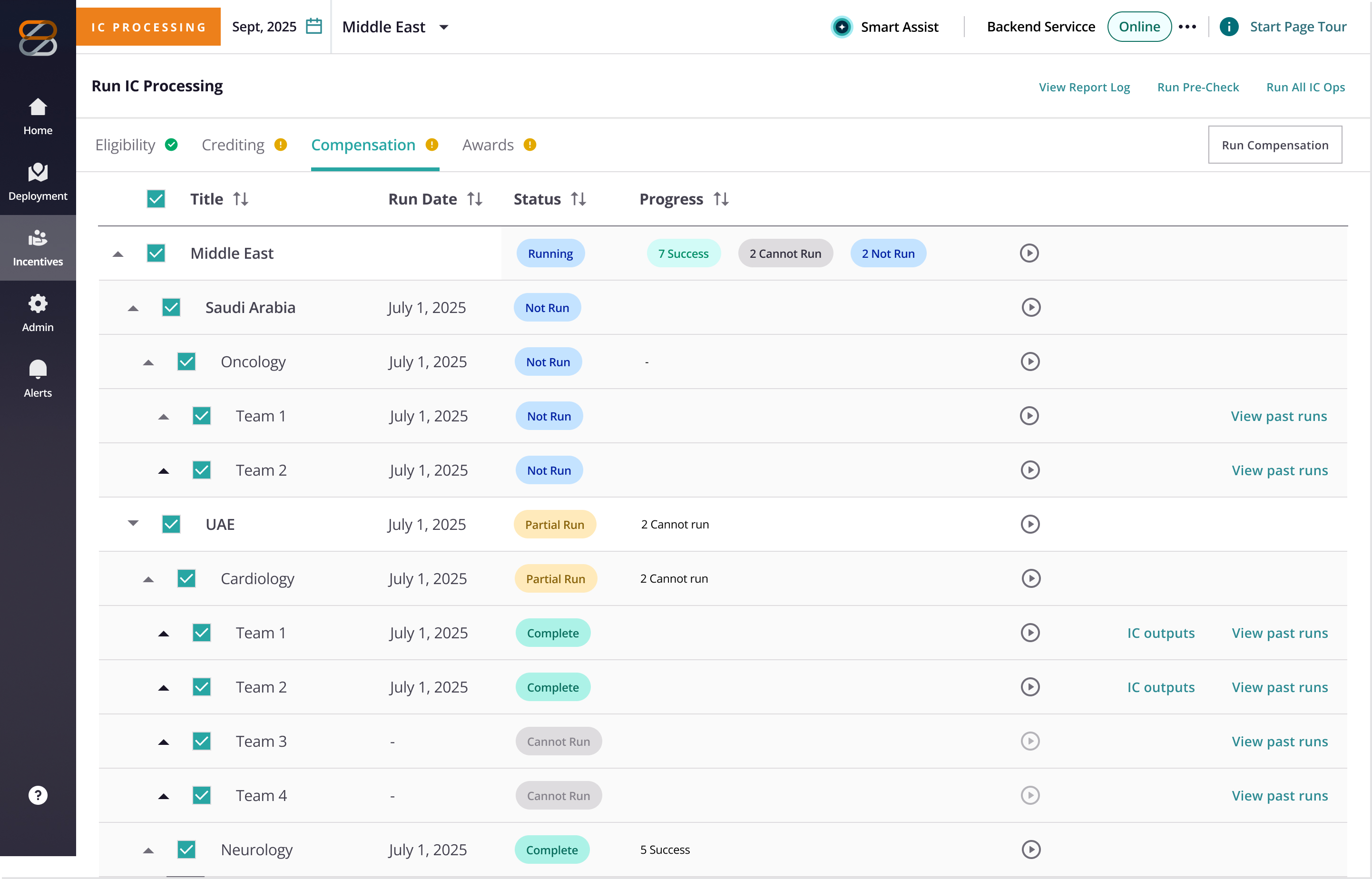
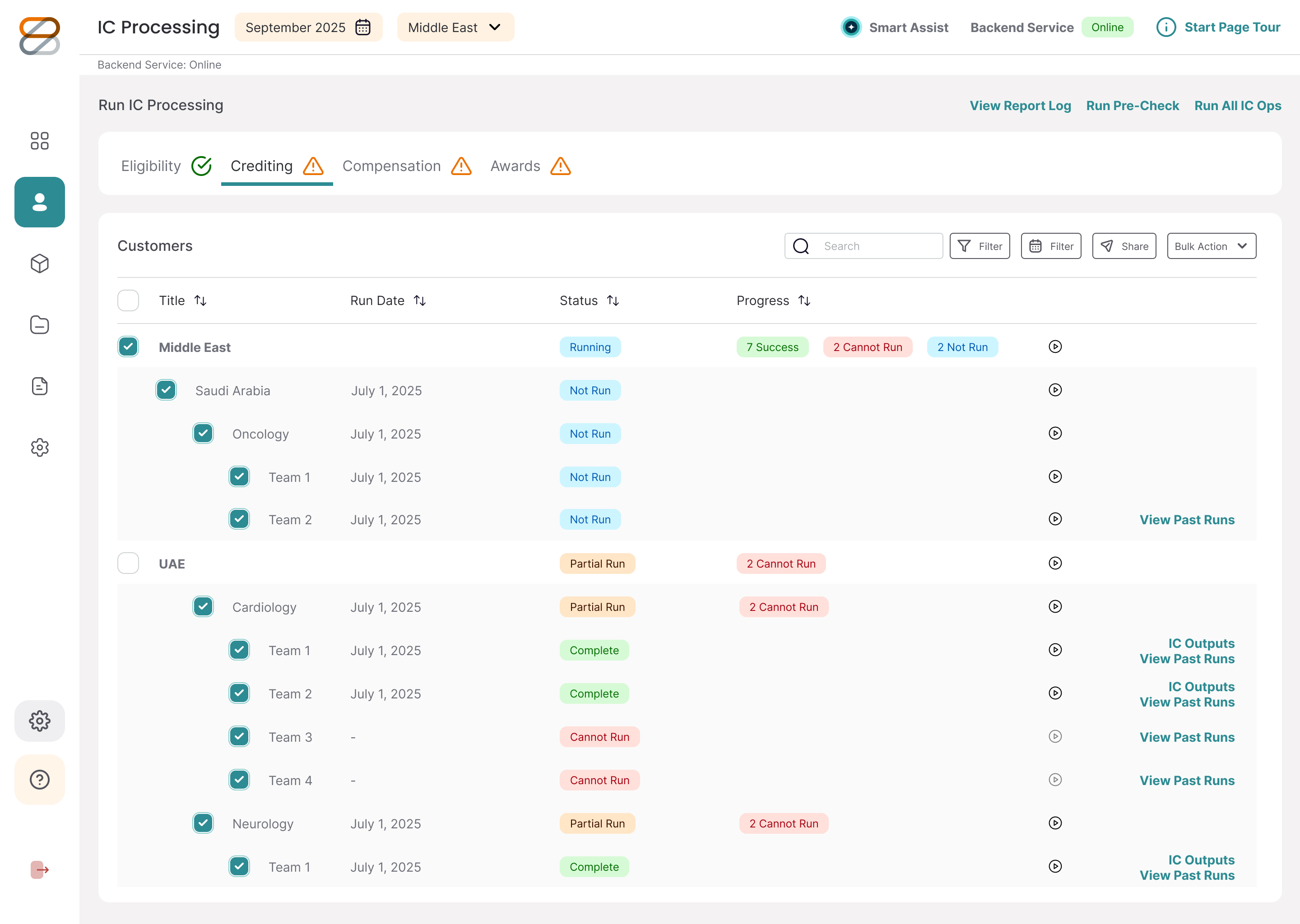
Processing run data table: Sortable table for tracking active runs. Color-coded status chips show progress at a glance, with contextual controls right in the action column.
Design decisions
Column sorting indicators: Header indicators make it easy to re-sort dense rows by date, status, or region.
Status chip system: Color-coded tags (Running, Planned, Complete) keep progress states clear and consistent.
Expandable row hierarchy: Color-coded tags (Running, Planned, Complete) keep progress states clear and consistent.
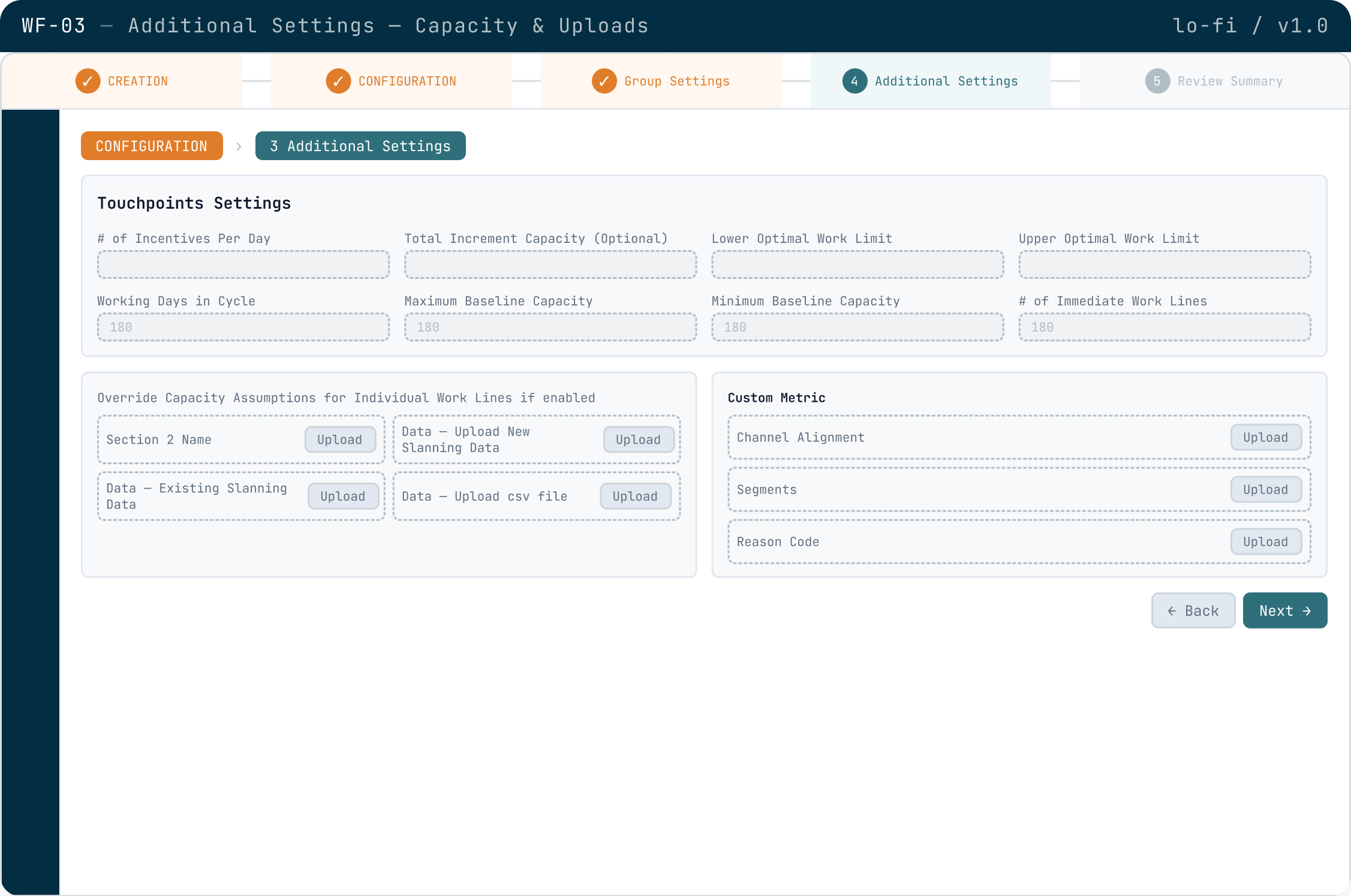
Screen notes
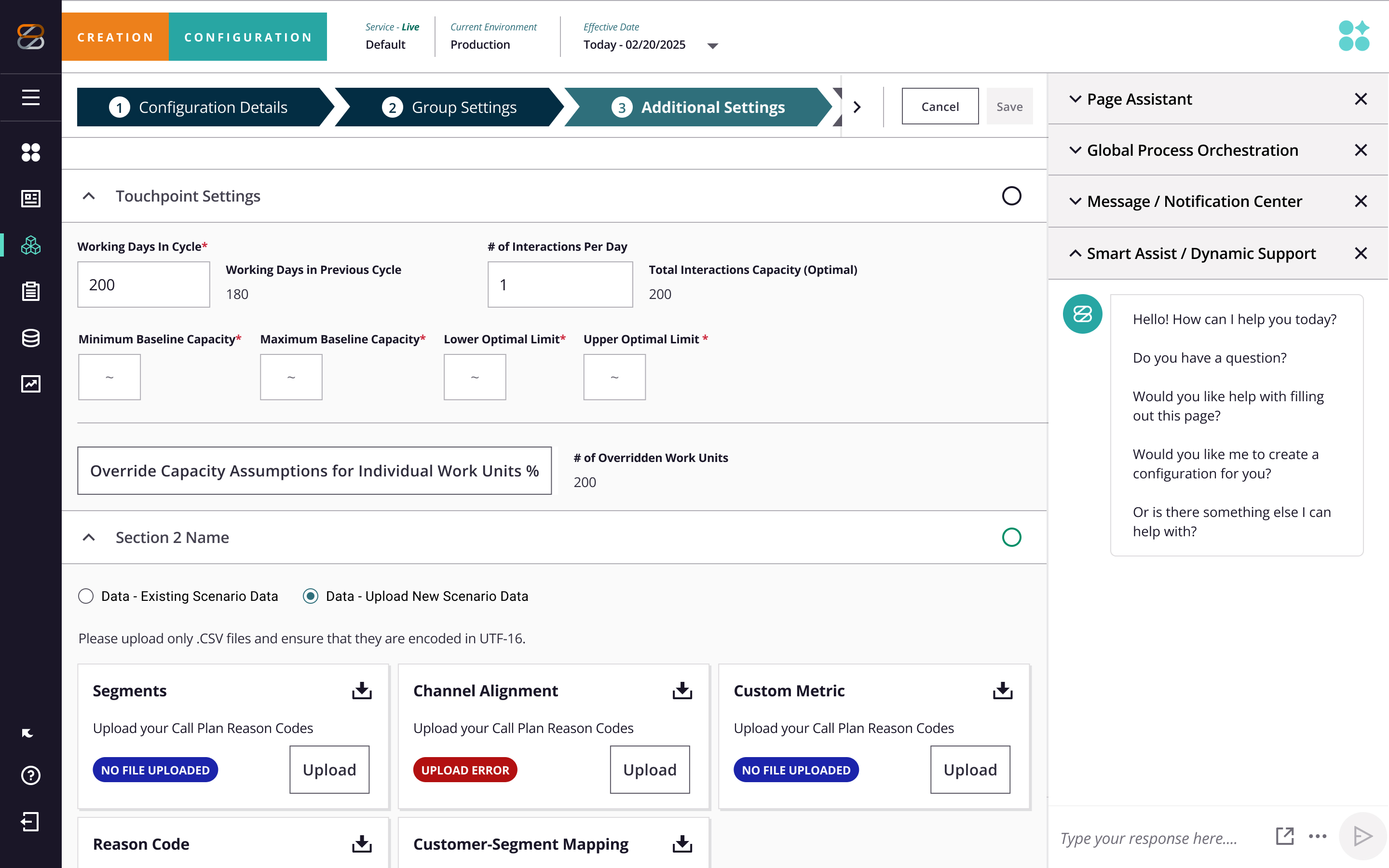
Capacity settings & file upload grid: Multi-column layout for setting touchpoint thresholds paired with CSV drop zones for optional data overrides.
Design decisions
Numeric input grid: Grouped related capacity fields into a structured 4-column layout to speed up form scanning.
Inline upload zones: Placed CSV upload buttons directly alongside work lines to make file attachment obvious.
Progressive disclosure: Separated required capacity fields from optional overrides to reduce initial visual noise.
DESIGN TOKENS & COLOR SYSTEM
Implementing design tokens to scale visual consistency
To eliminate cross-platform visual drift, I architected a unified design token system that bridges the gap between Figma and production code. By replacing ad-hoc hex values with a standardized semantic structure, we established a single source of truth across web and mobile.
Token Architecture
Multi-tier primitive and semantic structure
Single naming convention unified inside Figma
Future-proof system that eliminates design debt as product scales
Cross-Platform Sync
Token system spans web and iOS
Co-authored naming schema with mobile and web engineers
Reduced component ambiguity and streamlined dev handoffs
Scale & Enablement
Cut engineering implementation time by ~30%
Owned tokenization of core component libraries across product design
Led literacy workshops to drive cross-functional adoption
Primary / Brand
Interactive elements, CTAs
Primary / Brand Dark
Hover state
Primary / Brand Darkest
Pressed state, headers
Text
Primary text
Secondary Text
Labels, captions
Surface
Page background
Card
White backgrounds
Focus
Focus rings, links
Error / Fail
Destructive, contrast fail
Success
Confirmation states
Warning
Caution states
Info
Information states
Component Library
Comprehensive component states
Every component was built with five core states to ensure accessibility, visual consistency, and seamless dev handoff across the system.
Button — Solid (Primary)
Default

Add Task
Save

Default state
bg: #2F6F7B · border: #2f6f7b
Button — Solid (Primary)
Hover
Add Task
Save

Hover state
bg: #2d535f · border: #2d535f
Button — Solid (Primary)
Pressed
Add Task
Save

Pressed state
bg: #022d42 · border: #022d42
Button — Solid (Primary)
Focused

Add Task
Save

Focused state
bg: #2f6f7b · border: #2f6f7b
Button — Solid (Primary)
Disabled

Add Task
Save

Disabled state
bg: #f4f3f3 · border: #f4f3f3
All states at a glance

Button
Button
Button
Button

Button
Create Project
Save Draft
Processing…
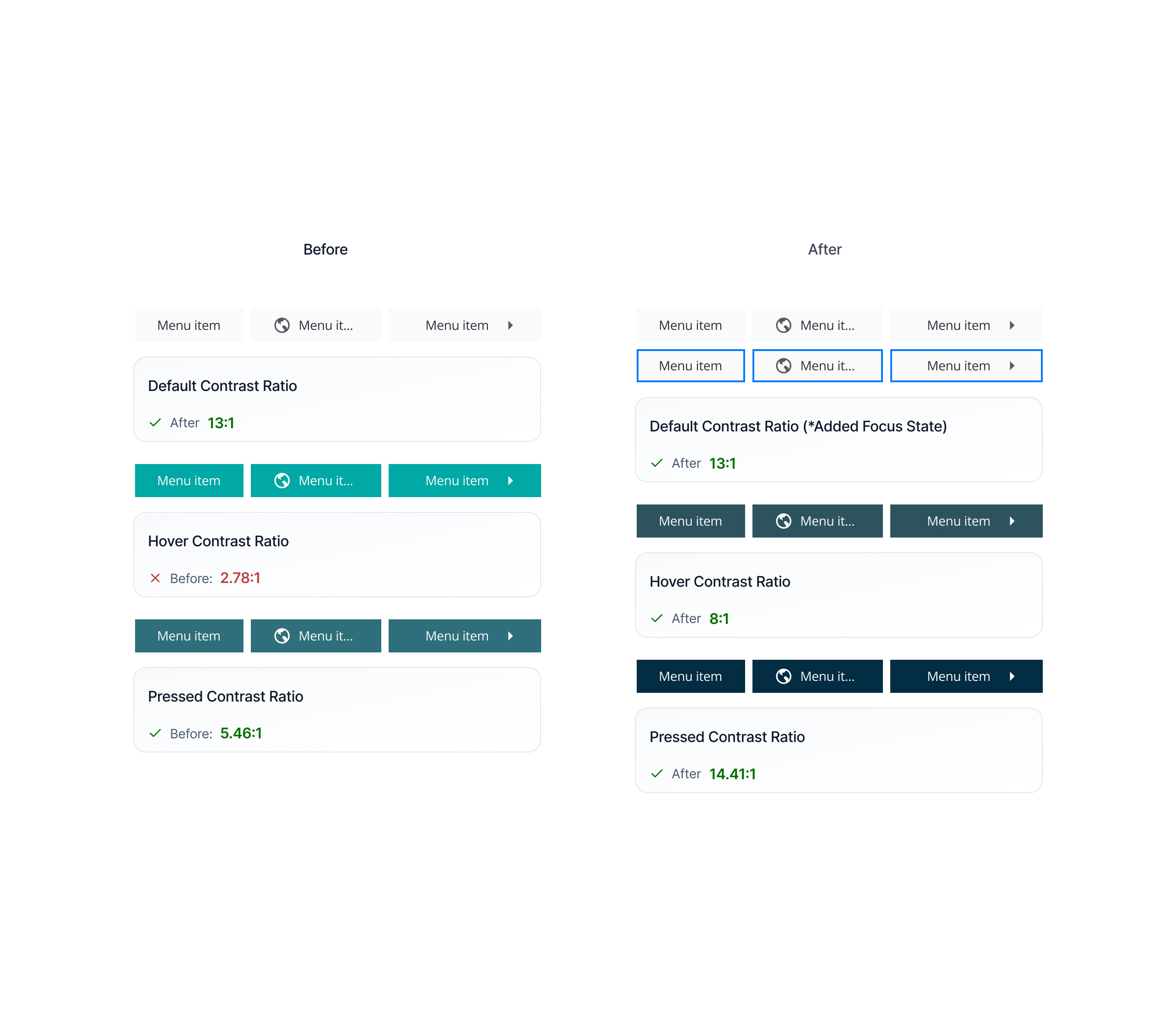
Navigation — Menu Link states
Default
Dashboard
Projects
Reports
Settings
bg: #fafafa · text: #2f2c3c
Navigation — Menu Link states
hover
Dashboard
Projects
Reports
Settings
bg: #2d535f · text: #fafafa
Navigation — Menu Link states
Focus
Dashboard
Projects
Reports
Settings
bg: #fafafa · text: #2f2c3c
Navigation — Menu Link states
Pressed
Dashboard
Projects
Reports
Settings
bg: #2d535f · text: #fafafa
Beginning to implement AI interactions
Minimum Baseline Capacity *
e.g. 250

AI
Maximum Baseline Capacity *
e.g. 1,200
AI
Lower Optimal Limit *
e.g. 400
AI
Capacity Unit *

Re-suggest
Requests / sec


Fill all with AI
Minimum Baseline Capacity *
e.g. 250
AI
Maximum Baseline Capacity *
e.g. 1,200
AI
Lower Optimal Limit *
e.g. 400
AI
Capacity Unit *
Re-suggest
Requests / sec

Requests/sec is the most common unit for baseline capacity planning in web services.
✕
Scaling Policy *

Revert
Re-write

AI generated
305 chars
Scale up when average CPU utilization exceeds 70% for two consecutive 5-minute windows. Scale down only after sustained utilization remains below 40% for 15 minutes to avoid thrashing. Maintain a minimum of 2 healthy instances at all times, and cap horizontal scaling at 8 instances during off-peak hours.
Conservative scale-down threshold prevents oscillation under variable load
✕
Configuration Notes *
0 chars
Document assumptions, data sources, and constraints…
AI
AI-Enabled Design Systems
From manual maintenance
to scalable intelligence
I integrate intelligent automation and custom scripts into design system operations to eliminate repetitive maintenance overhead. By establishing automated gap detection and continuous auditing, we shifted our team from reactive maintenance to proactive craft, establishing a predictable, high-velocity design cadence.
Automated Docs
Gap Detection
Tool Evaluation
Workflow Scripts
Governance
Training
Speed & Automation
Automated documentation generation:
Built AI-assisted workflows to generate component specs and usage guidelines, dramatically reducing manual documentation time.
Continuous system auditing:
Used automated scripts to scan large libraries, catching hidden specification gaps and outdated patterns before they ever hit production.
Workflow optimization:
Targeted repetitive tasks to cut down team overhead, rapidly pivoting setups whenever an initial prompt or strategy failed.
Tooling & Governance
Evaluating the architecture:
Evaluated Supernova vs. Zeroheight to provide leadership with clear roadmaps covering cost, integration, and scalability — ultimately defining the migration strategy to consolidate our tooling footprint.
Building practical tooling:
Turned emerging automation capabilities into simple, everyday workflows that add immediate value without creating design debt.
Quality & accessibility governance:
Balanced automated tools with strict manual reviews, ensuring all generated documentation met core accessibility standards.
Leadership & Adoption
Hands-on team training:
Led interactive workshops to help designers adopt new tools responsibly, focusing on practical workflows that drove organic adoption.
Cross-functional alignment:
Aligned design, engineering, and leadership on technical limits to ensure we shipped stable features within our actual product lifecycle.
Keeping design human-led:
Managed automated tools purely for data synthesis and scaling, keeping core UX strategy and product judgment strictly human-led.
Accessibility Overhaul
From zero to
100% AA compliance
I led the initiative to transition our design system to 100% WCAG Level AA compliance across web and iOS. Moving away from reactive, end-of-project checklists, I established proactive token libraries and systematic documentation that aligned design and engineering from day one.
The result: a measurable, audit-ready framework that eliminated guesswork and streamlined enterprise client delivery.
100%
WCAG AA compliance, web + iOS
VPATs
Authored VPATs to assist in product adoption and presented as a service to clients
US-wide
US lunch-and-learn enablement program
100%
proactive tokens
Systemic Impact
Nationwide Enablement:
Led US-wide enablement sessions, training consultants and client teams to confidently pitch accessibility compliance to prospective enterprise accounts.
VPAT & Sales Enablement:
Conducted comprehensive audits to achieve 100% WCAG Level AA across web and iOS, authoring the formal VPATs that directly unlocked new enterprise sales revenue.
Accessible Architecture:
Created semantic token libraries and strict screen-reader specifications to ensure a seamless, compliant product foundation across all client touchpoints.
Problem Solving
Roadmap Development:
Navigated a chaotic, undefined scope by mapping out a clear technical timeline for the massive accessibility migration.
Cross-Platform Parity:
Balanced tricky WCAG rules with daily usability, keeping web and native mobile components perfectly in sync.
Adaptive Execution:
Pivoted design strategies quickly when hitting technical development walls, keeping engineering moving without losing momentum.
Integration
Cross-Functional Bridge:
Handled end-to-end execution, acting as the daily translator between design and engineering teams.
Process Optimization:
Partnered with developers to build automated compliance checks and clean documentation directly into the active deployment pipeline.
Team Enablement:
Created shared onboarding guides to take the pressure off a single owner, making the system easy for new teams to adopt.
Aa
5.43:1
AA Pass
Aa
7.18:1
AAA Pass
Aa
15.2:1
AAA Pass
Aa
4.5:1
AA Pass
Aa
18.4:1
AAA Pass
Aa
4.93:1
AAA Pass
Aa
5.7:1
AA Pass
Aa
14.38:1
AAA Pass
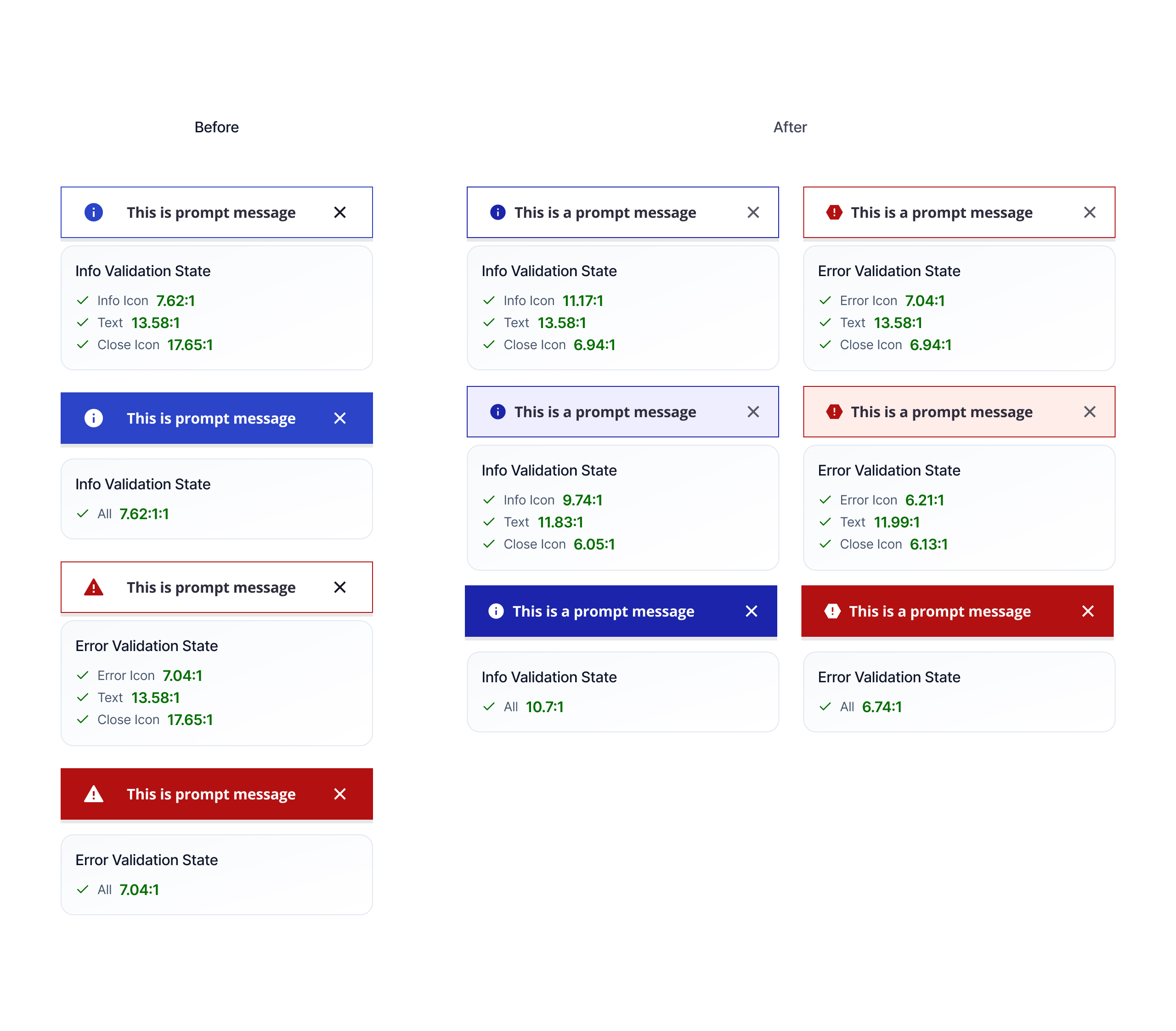
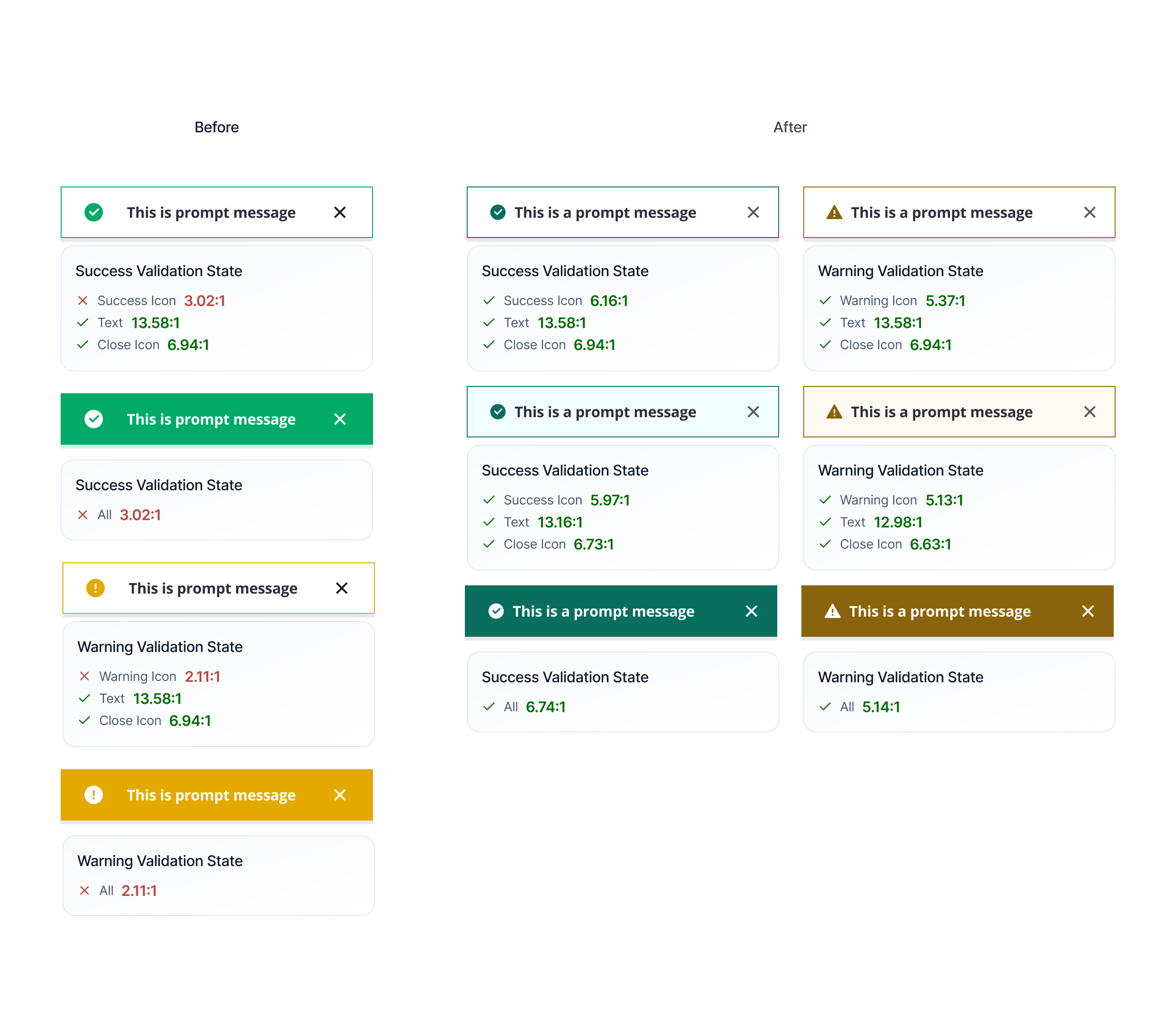
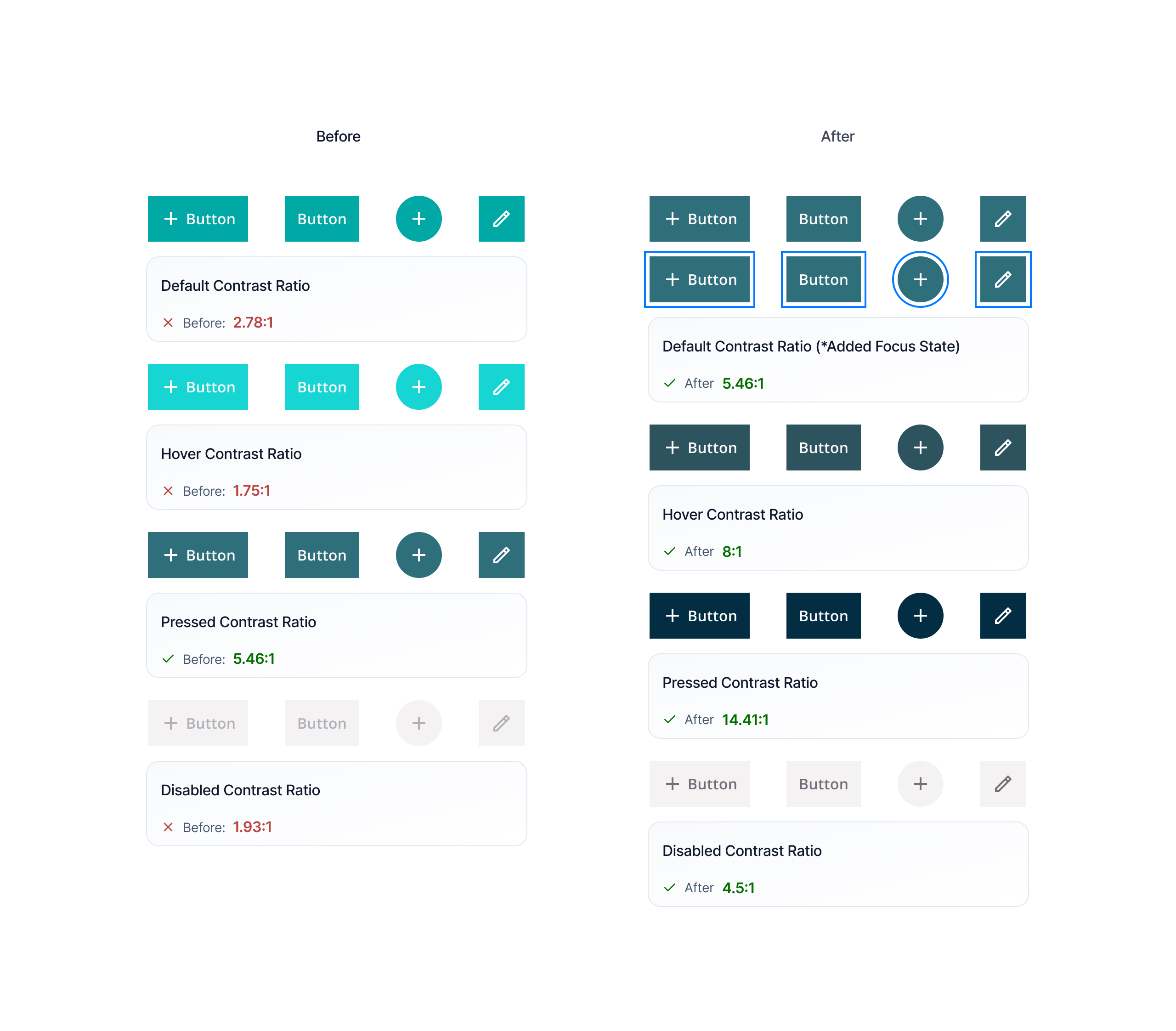
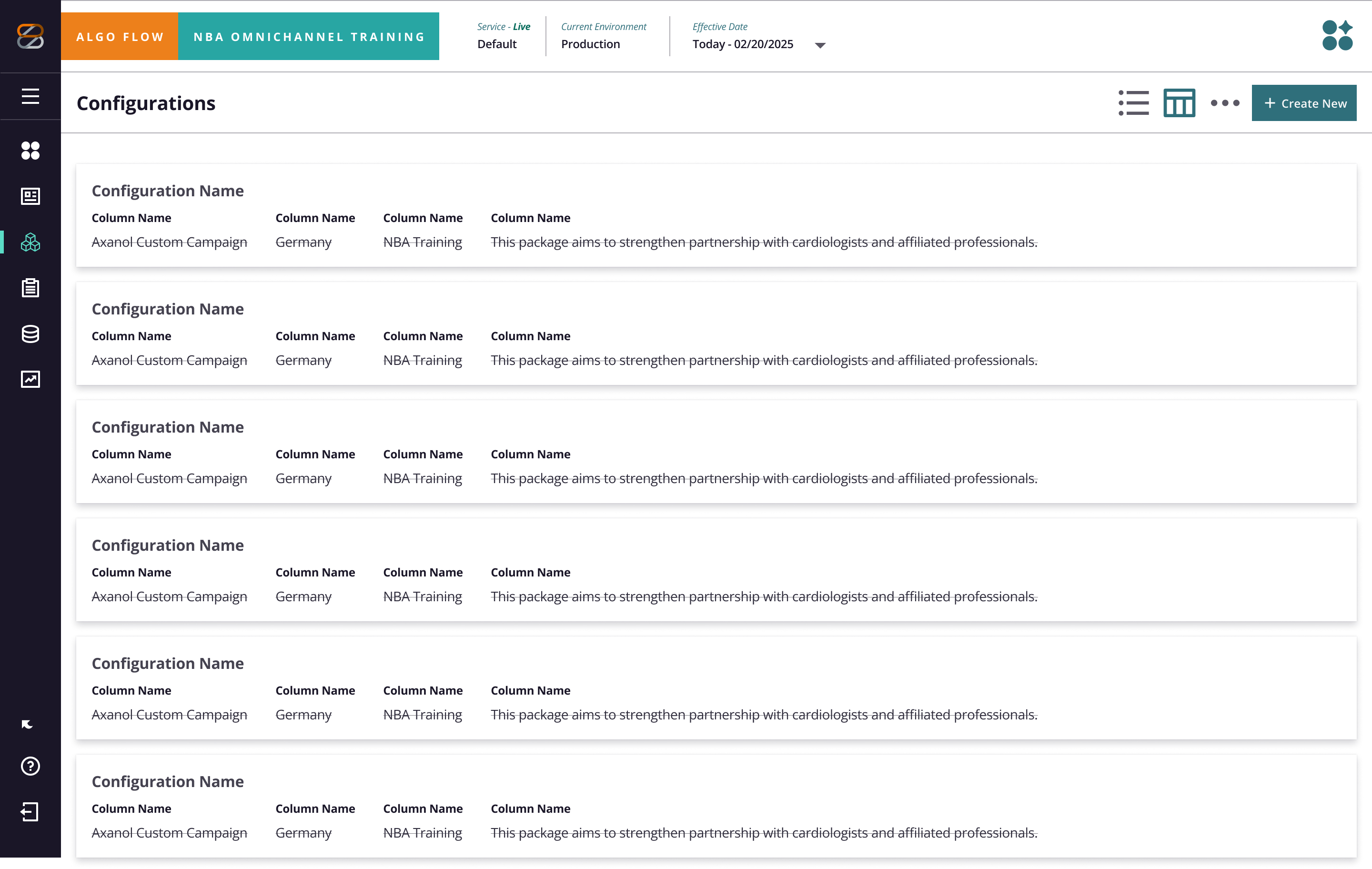
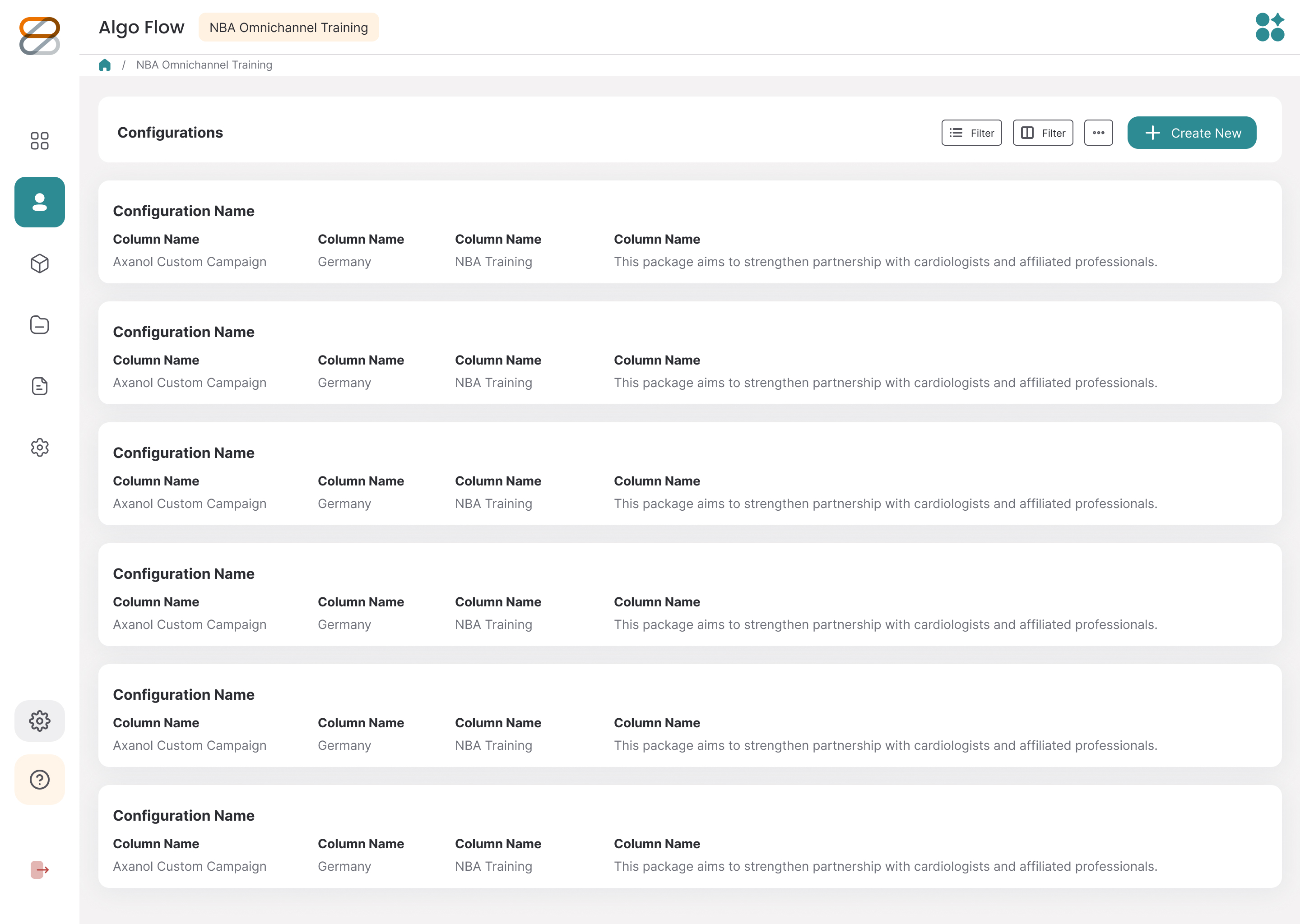
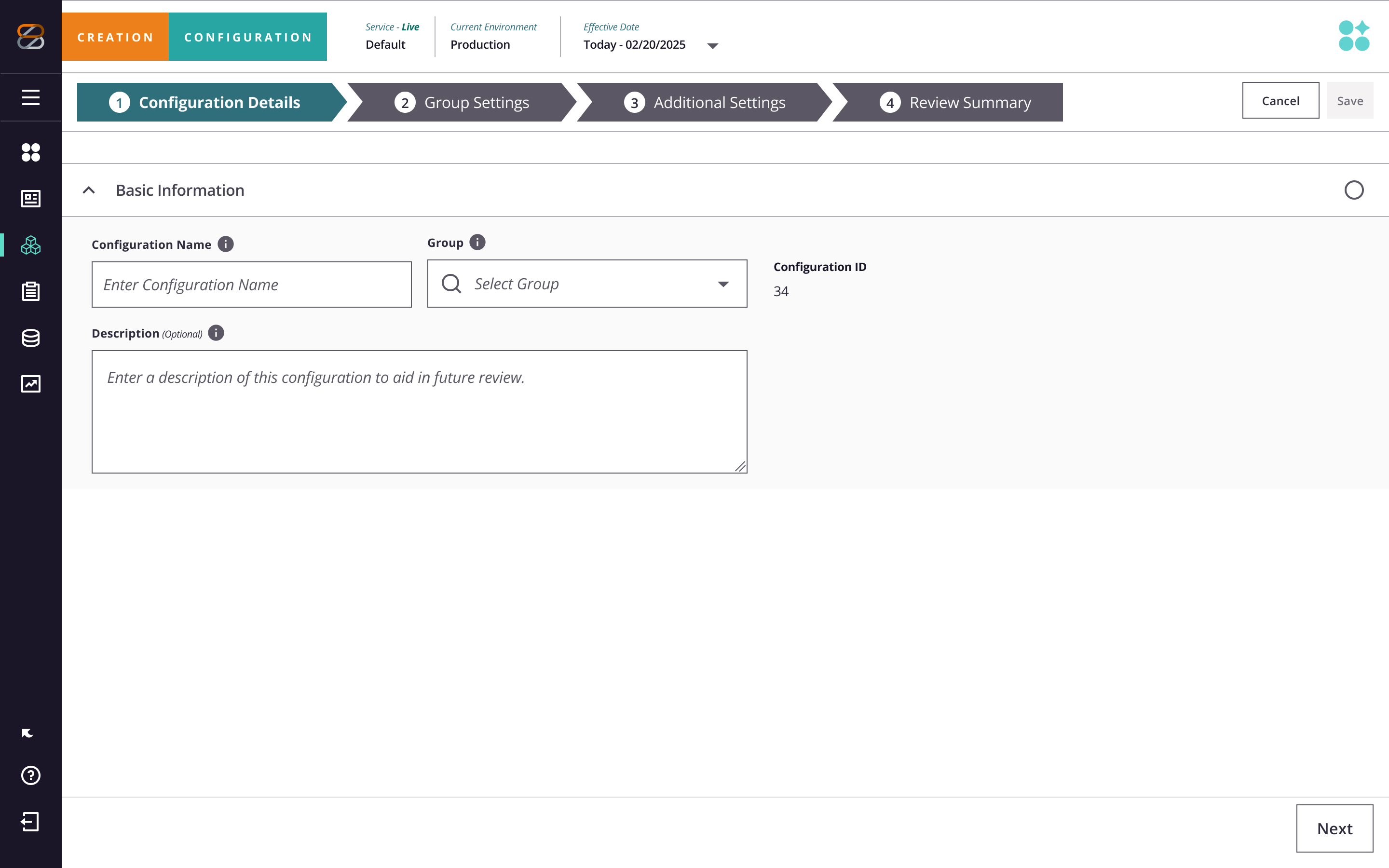
Final Screens
High-fidelity deliverables.
Old and new.
OUTCOMES & TENURE IMPACT
Measuring systemic
transformation
Over the course of my tenure, I led the end-to-end overhaul of our design system—architecting a multi-brand semantic token system across 80+ components, reaching 100% WCAG Level AA compliance, and introducing AI-ready UI patterns.
By bridging Figma specs directly with production code, we eliminated cross-platform visual drift, slashed engineering implementation time by ~30%, and significantly reduced component confusion across product, design, and development teams.
Developer Handoff Efficiency
3 days
2 weeks baseline → -60%
Validation Cycle Speed
60% faster
Generative & interactive AI workflows
Cross-Product Scale
10 teams
100% Web & Native coverage
WCAG Level AA
100%
All 80+ core components
Product Design
·
ZS Associates
·
2022 - Present
ZS Associates
Design System & Product Design
End-to-end component architecture and UI strategy for enterprise SaaS platforms. Owned the creation and rollout of a semantic token framework, standardized accessibility guidelines, and built a scaled component library to unify product experiences across cross-functional engineering teams.
UX Design
Design Systems
Accessibility
Component Library
Figma
Design approach
Design Systems & UI
I build the visual languages that connect design and development.
System Overhaul: Modernized ZS's core component libraries with semantic design tokens to streamline developer handoff.
Production Speed: Anchored frameworks in strict WCAG accessibility standards to wipe out design debt and boost production speed.
Product Experience
I translate complex, highly ambiguous problems into straightforward UX and UI design.
Iterative Process: Lean into rapid prototyping and testing to pivot quickly whenever an initial hypothesis fails.
Business Value: Balance data-driven strategies with strong visual execution to boost adoption and reduce user churn.
Leadership & Strategy
I bridge the gap between high-level business strategy and everyday design execution.
Cross-Functional Reality: Partner closely with product and engineering to navigate complex lifecycles and build scalable workflows.
Strategic Alignment: Keep design decisions tightly tied to the broader product roadmap to drive measurable business objectives.
DESIGN SYSTEM OPERATIONS & DISCOVERY
Modernizing the component ecosystem
As the design system lead, I audited and revamped our core component architecture to support modern UI patterns, AI-driven workflows, and strict accessibility standards.
Beyond maintaining our daily design system operations, I owned the creation of our semantic token framework and refactored existing UI components into modular, AI-ready assets—ensuring seamless token translation for automated UI generation while baking WCAG AA compliance into every state.
80+
core components modernized
100%
WCAG AA compliant states
Complete
semantic token framework
created
AI-Ready
component architecture
LAYOUT STRATEGY & IA
Architecting complex data density
Before jumping into visual styling, the ream mapped out the structural framework and layout logic for our workflow screens. The goal here was figuring out how to handle heavy data without making the screens feel cluttered, especially across multi-step setup flows and complex team tables.
Getting the layout hierarchy right early helped us iron out tricky interactions—like multi-region assignments and inline status updates—long before building out the high-fidelity component library.
WF-01
—
Healthcheck Readiness & Plan Setup
lo-fi / v1.0
Cancel
Save
Plan Design Dashboard
›
Healthcheck Readiness & Plan Setup
IN PROGRESS
Start Healthcheck
View Healthcheck
Applies To:
Europe A
Team A
Team B
Team C
Cardiology
+ 3
Start Healthcheck
Europe B
Team A
Team B
Team C
Cardiology
Start Healthcheck
Europe C
Team A
Team B
Team C
Cardiology
Start Healthcheck
Americas
Team A
Team B
Team C
Cardiology
Start Healthcheck
Sales Ops
Team A
Team B
Team C
Cardiology
Start Healthcheck
Smart Assist
Backend Services
View Report Log
Run Past Runs
Run Configuration
Screen notes
Multi-region team assignment matrix: Organized teams into regional tags so managers can easily run healthchecks for specific locations right from the table row.
Design decisions
Region-scoped team picker: Used clean tagging to keep dense rows from feeling overwhelming.
Inline action buttons: Placed CTA buttons directly next to each region row so the trigger action always makes spatial sense.
Inline status badges: Added clear badges to show progress states without pushing or shifting the table layout.
WF-02
—
Run IC Processing
lo-fi / v1.0
Sep, 2025
Middle East
Configurtation ↑
Awards ↑
Status ↑
7 Sections
Progress: 1↑
3 Current Run
+ New Run
Creating
Configurtation
Awards
Status 1↑
Run Date 1↑
Running
Next Run
Title
Run Date
Country/Team
Next Run
Status
Actions
Middle East
Title 11
Saudi Arabia
July 1, 2025
July 1, 2025
Run Run
2 Current run
UAE
July 1, 2025
July 1, 2025
Run Run
2 Current run
Cardiology
July 1, 2025
July 1, 2025
Planned Run
Team 1
Team 2
July 1, 2025
July 1, 2025
Complete
1 bundle
Team 3
Neurology
July 1, 2025
July 1, 2025
Running
Screen notes
Processing run data table: Sortable table for tracking active runs. Color-coded status chips show progress at a glance, with contextual controls right in the action column.
Design decisions
Column sorting indicators: Header indicators make it easy to re-sort dense rows by date, status, or region.
Status chip system: Color-coded tags (Running, Planned, Complete) keep progress states clear and consistent.
Expandable row hierarchy: Color-coded tags (Running, Planned, Complete) keep progress states clear and consistent.
WF-03
—
Additional Settings — Capacity & Uploads
lo-fi / v1.0
✓
CREATION
✓
CONFIGURATION
✓
Group Settings
4
Additional Settings
5
Review Summary
CONFIGURATION
›
3 Additional Settings
Touchpoints Settings
# of Incentives Per Day
Total Increment Capacity (Optional)
Lower Optimal Work Limit
Upper Optimal Work Limit
Working Days in Cycle
180
Maximum Baseline Capacity
180
Minimum Baseline Capacity
180
# of Immediate Work Lines
180
Override Capacity Assumptions for Individual Work Lines if enabled
Section 2 Name
Upload
Data — Upload New Slanning Data
Upload
Data — Existing Slanning Data
Upload
Data — Upload csv file
Upload
Custom Metric
Channel Alignment
Upload
Segments
Upload
Reason Code
Upload
← Back
Next →
Screen notes
Capacity settings & file upload grid: Multi-column layout for setting touchpoint thresholds paired with CSV drop zones for optional data overrides.
Design decisions
Numeric input grid: Grouped related capacity fields into a structured 4-column layout to speed up form scanning.
Inline upload zones: Placed CSV upload buttons directly alongside work lines to make file attachment obvious.
Progressive disclosure: Separated required capacity fields from optional overrides to reduce initial visual noise.
DESIGN TOKENS & COLOR SYSTEM
Implementing design tokens to scale visual consistency
To eliminate cross-platform visual drift, I architected a unified design token system that bridges the gap between Figma and production code. By replacing ad-hoc hex values with a standardized semantic structure, we established a single source of truth across web and mobile.
Token Architecture
Multi-tier primitive and semantic structure
Single naming convention unified inside Figma
Future-proof system that eliminates design debt as product scales
Cross-Platform Sync
Token system spans web and iOS
Co-authored naming schema with mobile and web engineers
Reduced component ambiguity and streamlined dev handoffs
Scale & Enablement
Cut engineering implementation time by ~30%
Owned tokenization of core component libraries across product design
Led literacy workshops to drive cross-functional adoption
Primary / Brand
Interactive elements, CTAs
Primary / Brand Dark
Hover state
Primary / Brand Darkest
Pressed state, headers
Text
Primary text
Secondary Text
Labels, captions
Surface
Page background
Card
White backgrounds
Focus
Focus rings, links
Error / Fail
Destructive, contrast fail
Success
Confirmation states
Warning
Caution states
Info
Information states
Component Library
Comprehensive component states
Every component was built with five core states to ensure accessibility, visual consistency, and seamless dev handoff across the system.
Button — Solid (Primary)
Default
Add Task
Save
Default state
bg: #2F6F7B · border: #2f6f7b
Button — Solid (Primary)
Hover
Add Task
Save
Hover state
bg: #2d535f · border: #2d535f
Button — Solid (Primary)
Pressed
Add Task
Save
Pressed state
bg: #022d42 · border: #022d42
Button — Solid (Primary)
Focused
Add Task
Save
Focused state
bg: #2f6f7b · border: #2f6f7b
focus ring: #027aff
Button — Solid (Primary)
Disabled
Add Task
Save
Disabled state
bg: #f4f3f3 · border: #f4f3f3
All states at a glance
Button
Default
#2f6f7b
Button
Hover
#2d535f
Button
Pressed
#022d42
Button
Focused
#2f6f7b
Button
Disabled
#f4f3f3
Create Project
Save Draft
Processing…
Navigation — Menu Link states
Default
Dashboard
Projects
Reports
Settings
bg: #fafafa · text: #2f2c3c
Navigation — Menu Link states
hover
Dashboard
Projects
Reports
Settings
bg: #2d535f · text: #fafafa
Navigation — Menu Link states
Focus
Dashboard
Projects
Reports
Settings
bg: #fafafa · text: #2f2c3c
Navigation — Menu Link states
Pressed
Dashboard
Projects
Reports
Settings
bg: #2d535f · text: #fafafa
Beginning to implement AI interactions
Minimum Baseline Capacity *
e.g. 250
AI
Maximum Baseline Capacity *
e.g. 1,200
AI
Lower Optimal Limit *
e.g. 400
AI
Capacity Unit *
Re-suggest
Requests / sec
Fill all with AI
Minimum Baseline Capacity *
e.g. 250
AI
Maximum Baseline Capacity *
e.g. 1,200
AI
Lower Optimal Limit *
e.g. 400
AI
Capacity Unit *
Re-suggest
Requests / sec
Requests/sec is the most common unit for baseline capacity planning in web services.
✕
Scaling Policy *
Revert
Re-write
AI generated
305 chars
Scale up when average CPU utilization exceeds 70% for two consecutive 5-minute windows. Scale down only after sustained utilization remains below 40% for 15 minutes to avoid thrashing. Maintain a minimum of 2 healthy instances at all times, and cap horizontal scaling at 8 instances during off-peak hours.
Conservative scale-down threshold prevents oscillation under variable load
✕
Configuration Notes *
0 chars
Document assumptions, data sources, and constraints…
AI
AI-Enabled Design Systems
From manual maintenance
to scalable intelligence
I integrate intelligent automation and custom scripts into design system operations to eliminate repetitive maintenance overhead. By establishing automated gap detection and continuous auditing, we shifted our team from reactive maintenance to proactive craft, establishing a predictable, high-velocity design cadence.
Automated Docs
Gap Detection
Tool Evaluation
Workflow Scripts
Governance
Training
Speed & Automation
Automated documentation generation:
Built AI-assisted workflows to generate component specs and usage guidelines, dramatically reducing manual documentation time.
Continuous system auditing:
Used automated scripts to scan large libraries, catching hidden specification gaps and outdated patterns before they ever hit production.
Workflow optimization:
Targeted repetitive tasks to cut down team overhead, rapidly pivoting setups whenever an initial prompt or strategy failed.
Tooling & Governance
Evaluating the architecture:
Evaluated Supernova vs. Zeroheight to provide leadership with clear roadmaps covering cost, integration, and scalability — ultimately defining the migration strategy to consolidate our tooling footprint.
Building practical tooling:
Turned emerging automation capabilities into simple, everyday workflows that add immediate value without creating design debt.
Quality & accessibility governance:
Balanced automated tools with strict manual reviews, ensuring all generated documentation met core accessibility standards.
Leadership & Adoption
Hands-on team training:
Led interactive workshops to help designers adopt new tools responsibly, focusing on practical workflows that drove organic adoption.
Cross-functional alignment:
Aligned design, engineering, and leadership on technical limits to ensure we shipped stable features within our actual product lifecycle.
Keeping design human-led:
Managed automated tools purely for data synthesis and scaling, keeping core UX strategy and product judgment strictly human-led.
Accessibility Overhaul
From zero to
100% AA compliance
I led the initiative to transition our design system to 100% WCAG Level AA compliance across web and iOS. Moving away from reactive, end-of-project checklists, I established proactive token libraries and systematic documentation that aligned design and engineering from day one.
The result: a measurable, audit-ready framework that eliminated guesswork and streamlined enterprise client delivery.
100%
WCAG AA compliance, web + iOS
VPATs
Authored VPATs to assist in product adoption and presented as a service to clients
US-wide
US lunch-and-learn enablement program
100%
proactive tokens
Systemic Impact
Nationwide Enablement:
Led US-wide enablement sessions, training consultants and client teams to confidently pitch accessibility compliance to prospective enterprise accounts.
VPAT & Sales Enablement:
Conducted comprehensive audits to achieve 100% WCAG Level AA across web and iOS, authoring the formal VPATs that directly unlocked new enterprise sales revenue.
Accessible Architecture:
Created semantic token libraries and strict screen-reader specifications to ensure a seamless, compliant product foundation across all client touchpoints.
Problem Solving
Roadmap Development:
Navigated a chaotic, undefined scope by mapping out a clear technical timeline for the massive accessibility migration.
Cross-Platform Parity:
Balanced tricky WCAG rules with daily usability, keeping web and native mobile components perfectly in sync.
Adaptive Execution:
Pivoted design strategies quickly when hitting technical development walls, keeping engineering moving without losing momentum.
Integration
Cross-Functional Bridge:
Handled end-to-end execution, acting as the daily translator between design and engineering teams.
Process Optimization:
Partnered with developers to build automated compliance checks and clean documentation directly into the active deployment pipeline.
Team Enablement:
Created shared onboarding guides to take the pressure off a single owner, making the system easy for new teams to adopt.
Aa
Button text on default
#fafafa on #2f6f7b
5.43:1
AA Pass
Aa
Button text on hover
#fafafa on #2d535f
7.18:1
AAA Pass
Aa
Button text on pressed
#fafafa on #022d42
15.2:1
AAA Pass
Aa
Disabled text (WCAG exempt)
#716e79 on #f4f3f3
4.5:1
AA Pass
Aa
Body text on white
#0f172b on #ffffff
18.4:1
AAA Pass
Aa
Secondary text on surface
#45556c on #f8f9fa
4.93:1
AAA Pass
Aa
Brand on white
#2f6f7b on #ffffff
5.7:1
AA Pass
Aa
Brand darkest on white
#032d43 on #ffffff
14.38:1
AAA Pass
Final Screens
High-fidelity deliverables.
Old and new.
OUTCOMES & TENURE IMPACT
Measuring systemic
transformation
Over the course of my tenure, I led the end-to-end overhaul of our design system—architecting a multi-brand semantic token system across 80+ components, reaching 100% WCAG Level AA compliance, and introducing AI-ready UI patterns.
By bridging Figma specs directly with production code, we eliminated cross-platform visual drift, slashed engineering implementation time by ~30%, and significantly reduced component confusion across product, design, and development teams.
Developer Handoff Efficiency
3 days
2 weeks baseline → -60%
Validation Cycle Speed
60% faster
Generative & interactive AI workflows
Cross-Product Scale
10 teams
100% Web & Native coverage
WCAG Level AA
100%
All 80+ core components
Product Design
·
ZS Associates
·
2022 - Present
ZS Associates
Design System & Product Design
End-to-end component architecture and UI strategy for enterprise SaaS platforms. Owned the creation and rollout of a semantic token framework, standardized accessibility guidelines, and built a scaled component library to unify product experiences across cross-functional engineering teams.
UX Design
Design Systems
Accessibility
Component Library
Figma
Design approach
Design Systems & UI
I build the visual languages that connect design and development.
System Overhaul: Modernized ZS's core component libraries with semantic design tokens to streamline developer handoff.
Production Speed: Anchored frameworks in strict WCAG accessibility standards to wipe out design debt and boost production speed.
Product Experience
I translate complex, highly ambiguous problems into straightforward UX and UI design.
Iterative Process: Lean into rapid prototyping and testing to pivot quickly whenever an initial hypothesis fails.
Business Value: Balance data-driven strategies with strong visual execution to boost adoption and reduce user churn.
Leadership & Strategy
I bridge the gap between high-level business strategy and everyday design execution.
Cross-Functional Reality: Partner closely with product and engineering to navigate complex lifecycles and build scalable workflows.
Strategic Alignment: Keep design decisions tightly tied to the broader product roadmap to drive measurable business objectives.
DESIGN SYSTEM OPERATIONS & DISCOVERY
Modernizing the component ecosystem
As the design system lead, I audited and revamped our core component architecture to support modern UI patterns, AI-driven workflows, and strict accessibility standards.
Beyond maintaining our daily design system operations, I owned the creation of our semantic token framework and refactored existing UI components into modular, AI-ready assets—ensuring seamless token translation for automated UI generation while baking WCAG AA compliance into every state.
80+
core components modernized
100%
WCAG AA compliant states
Complete
semantic token framework
created
AI-Ready
component architecture
LAYOUT STRATEGY & IA
Architecting complex data density
Before jumping into visual styling, the ream mapped out the structural framework and layout logic for our workflow screens. The goal here was figuring out how to handle heavy data without making the screens feel cluttered, especially across multi-step setup flows and complex team tables.
Getting the layout hierarchy right early helped us iron out tricky interactions—like multi-region assignments and inline status updates—long before building out the high-fidelity component library.
WF-01
—
Healthcheck Readiness & Plan Setup
lo-fi / v1.0
Cancel
Save
Plan Design Dashboard
›
Healthcheck Readiness & Plan Setup
IN PROGRESS
Start Healthcheck
View Healthcheck
Applies To:
Europe A
Team A
Team B
Team C
Cardiology
+ 3
Start Healthcheck
Europe B
Team A
Team B
Team C
Cardiology
Start Healthcheck
Europe C
Team A
Team B
Team C
Cardiology
Start Healthcheck
Americas
Team A
Team B
Team C
Cardiology
Start Healthcheck
Sales Ops
Team A
Team B
Team C
Cardiology
Start Healthcheck
Smart Assist
Backend Services
View Report Log
Run Past Runs
Run Configuration
Screen notes
Multi-region team assignment matrix: Organized teams into regional tags so managers can easily run healthchecks for specific locations right from the table row.
Design decisions
Region-scoped team picker: Used clean tagging to keep dense rows from feeling overwhelming.
Inline action buttons: Placed CTA buttons directly next to each region row so the trigger action always makes spatial sense.
Inline status badges: Added clear badges to show progress states without pushing or shifting the table layout.
WF-02
—
Run IC Processing
lo-fi / v1.0
Sep, 2025
Middle East
Configurtation ↑
Awards ↑
Status ↑
7 Sections
Progress: 1↑
3 Current Run
+ New Run
Creating
Configurtation
Awards
Status 1↑
Run Date 1↑
Running
Next Run
Title
Run Date
Country/Team
Next Run
Status
Actions
Middle East
Title 11
Saudi Arabia
July 1, 2025
July 1, 2025
Run Run
2 Current run
UAE
July 1, 2025
July 1, 2025
Run Run
2 Current run
Cardiology
July 1, 2025
July 1, 2025
Planned Run
Team 1
Team 2
July 1, 2025
July 1, 2025
Complete
1 bundle
Team 3
Neurology
July 1, 2025
July 1, 2025
Running
Screen notes
Processing run data table: Sortable table for tracking active runs. Color-coded status chips show progress at a glance, with contextual controls right in the action column.
Design decisions
Column sorting indicators: Header indicators make it easy to re-sort dense rows by date, status, or region.
Status chip system: Color-coded tags (Running, Planned, Complete) keep progress states clear and consistent.
Expandable row hierarchy: Color-coded tags (Running, Planned, Complete) keep progress states clear and consistent.
WF-03
—
Additional Settings — Capacity & Uploads
lo-fi / v1.0
✓
CREATION
✓
CONFIGURATION
✓
Group Settings
4
Additional Settings
5
Review Summary
CONFIGURATION
›
3 Additional Settings
Touchpoints Settings
# of Incentives Per Day
Total Increment Capacity (Optional)
Lower Optimal Work Limit
Upper Optimal Work Limit
Working Days in Cycle
180
Maximum Baseline Capacity
180
Minimum Baseline Capacity
180
# of Immediate Work Lines
180
Override Capacity Assumptions for Individual Work Lines if enabled
Section 2 Name
Upload
Data — Upload New Slanning Data
Upload
Data — Existing Slanning Data
Upload
Data — Upload csv file
Upload
Custom Metric
Channel Alignment
Upload
Segments
Upload
Reason Code
Upload
← Back
Next →
Screen notes
Capacity settings & file upload grid: Multi-column layout for setting touchpoint thresholds paired with CSV drop zones for optional data overrides.
Design decisions
Numeric input grid: Grouped related capacity fields into a structured 4-column layout to speed up form scanning.
Inline upload zones: Placed CSV upload buttons directly alongside work lines to make file attachment obvious.
Progressive disclosure: Separated required capacity fields from optional overrides to reduce initial visual noise.
DESIGN TOKENS & COLOR SYSTEM
Implementing design tokens to scale visual consistency
To eliminate cross-platform visual drift, I architected a unified design token system that bridges the gap between Figma and production code. By replacing ad-hoc hex values with a standardized semantic structure, we established a single source of truth across web and mobile.
Token Architecture
Multi-tier primitive and semantic structure
Single naming convention unified inside Figma
Future-proof system that eliminates design debt as product scales
Cross-Platform Sync
Token system spans web and iOS
Co-authored naming schema with mobile and web engineers
Reduced component ambiguity and streamlined dev handoffs
Scale & Enablement
Cut engineering implementation time by ~30%
Owned tokenization of core component libraries across product design
Led literacy workshops to drive cross-functional adoption
Primary / Brand
Interactive elements, CTAs
Primary / Brand Dark
Hover state
Primary / Brand Darkest
Pressed state, headers
Text
Primary text
Secondary Text
Labels, captions
Surface
Page background
Card
White backgrounds
Focus
Focus rings, links
Error / Fail
Destructive, contrast fail
Success
Confirmation states
Warning
Caution states
Info
Information states
Component Library
Comprehensive component states
Every component was built with five core states to ensure accessibility, visual consistency, and seamless dev handoff across the system.
Button — Solid (Primary)
Default
Add Task
Save
Default state
bg: #2F6F7B · border: #2f6f7b
Button — Solid (Primary)
Hover
Add Task
Save
Hover state
bg: #2d535f · border: #2d535f
Button — Solid (Primary)
Pressed
Add Task
Save
Pressed state
bg: #022d42 · border: #022d42
Button — Solid (Primary)
Focused
Add Task
Save
Focused state
bg: #2f6f7b · border: #2f6f7b
focus ring: #027aff
Button — Solid (Primary)
Disabled
Add Task
Save
Disabled state
bg: #f4f3f3 · border: #f4f3f3
All states at a glance
Button
Default
#2f6f7b
Button
Hover
#2d535f
Button
Pressed
#022d42
Button
Focused
#2f6f7b
Button
Disabled
#f4f3f3
Create Project
Save Draft
Processing…
Navigation — Menu Link states
Default
Dashboard
Projects
Reports
Settings
bg: #fafafa · text: #2f2c3c
Navigation — Menu Link states
hover
Dashboard
Projects
Reports
Settings
bg: #2d535f · text: #fafafa
Navigation — Menu Link states
Focus
Dashboard
Projects
Reports
Settings
bg: #fafafa · text: #2f2c3c
Navigation — Menu Link states
Pressed
Dashboard
Projects
Reports
Settings
bg: #2d535f · text: #fafafa
Beginning to implement AI interactions
Minimum Baseline Capacity *
e.g. 250
AI
Maximum Baseline Capacity *
e.g. 1,200
AI
Lower Optimal Limit *
e.g. 400
AI
Capacity Unit *
Re-suggest
Requests / sec
Fill all with AI
Minimum Baseline Capacity *
e.g. 250
AI
Maximum Baseline Capacity *
e.g. 1,200
AI
Lower Optimal Limit *
e.g. 400
AI
Capacity Unit *
Re-suggest
Requests / sec
Requests/sec is the most common unit for baseline capacity planning in web services.
✕
Scaling Policy *
Revert
Re-write
AI generated
305 chars
Scale up when average CPU utilization exceeds 70% for two consecutive 5-minute windows. Scale down only after sustained utilization remains below 40% for 15 minutes to avoid thrashing. Maintain a minimum of 2 healthy instances at all times, and cap horizontal scaling at 8 instances during off-peak hours.
Conservative scale-down threshold prevents oscillation under variable load
✕
Configuration Notes *
0 chars
Document assumptions, data sources, and constraints…
AI
AI-Enabled Design Systems
From manual maintenance
to scalable intelligence
I integrate intelligent automation and custom scripts into design system operations to eliminate repetitive maintenance overhead. By establishing automated gap detection and continuous auditing, we shifted our team from reactive maintenance to proactive craft, establishing a predictable, high-velocity design cadence.
Automated Docs
Gap Detection
Tool Evaluation
Workflow Scripts
Governance
Training
Speed & Automation
Automated documentation generation:
Built AI-assisted workflows to generate component specs and usage guidelines, dramatically reducing manual documentation time.
Continuous system auditing:
Used automated scripts to scan large libraries, catching hidden specification gaps and outdated patterns before they ever hit production.
Workflow optimization:
Targeted repetitive tasks to cut down team overhead, rapidly pivoting setups whenever an initial prompt or strategy failed.
Tooling & Governance
Evaluating the architecture:
Evaluated Supernova vs. Zeroheight to provide leadership with clear roadmaps covering cost, integration, and scalability — ultimately defining the migration strategy to consolidate our tooling footprint.
Building practical tooling:
Turned emerging automation capabilities into simple, everyday workflows that add immediate value without creating design debt.
Quality & accessibility governance:
Balanced automated tools with strict manual reviews, ensuring all generated documentation met core accessibility standards.
Leadership & Adoption
Hands-on team training:
Led interactive workshops to help designers adopt new tools responsibly, focusing on practical workflows that drove organic adoption.
Cross-functional alignment:
Aligned design, engineering, and leadership on technical limits to ensure we shipped stable features within our actual product lifecycle.
Keeping design human-led:
Managed automated tools purely for data synthesis and scaling, keeping core UX strategy and product judgment strictly human-led.
Accessibility Overhaul
From zero to
100% AA compliance
I led the initiative to transition our design system to 100% WCAG Level AA compliance across web and iOS. Moving away from reactive, end-of-project checklists, I established proactive token libraries and systematic documentation that aligned design and engineering from day one.
The result: a measurable, audit-ready framework that eliminated guesswork and streamlined enterprise client delivery.
100%
WCAG AA compliance, web + iOS
VPATs
Authored VPATs to assist in product adoption and presented as a service to clients
US-wide
US lunch-and-learn enablement program
100%
proactive tokens
Systemic Impact
Nationwide Enablement:
Led US-wide enablement sessions, training consultants and client teams to confidently pitch accessibility compliance to prospective enterprise accounts.
VPAT & Sales Enablement:
Conducted comprehensive audits to achieve 100% WCAG Level AA across web and iOS, authoring the formal VPATs that directly unlocked new enterprise sales revenue.
Accessible Architecture:
Created semantic token libraries and strict screen-reader specifications to ensure a seamless, compliant product foundation across all client touchpoints.
Problem Solving
Roadmap Development:
Navigated a chaotic, undefined scope by mapping out a clear technical timeline for the massive accessibility migration.
Cross-Platform Parity:
Balanced tricky WCAG rules with daily usability, keeping web and native mobile components perfectly in sync.
Adaptive Execution:
Pivoted design strategies quickly when hitting technical development walls, keeping engineering moving without losing momentum.
Integration
Cross-Functional Bridge:
Handled end-to-end execution, acting as the daily translator between design and engineering teams.
Process Optimization:
Partnered with developers to build automated compliance checks and clean documentation directly into the active deployment pipeline.
Team Enablement:
Created shared onboarding guides to take the pressure off a single owner, making the system easy for new teams to adopt.
Aa
Button text on default
#fafafa on #2f6f7b
5.43:1
AA Pass
Aa
Button text on hover
#fafafa on #2d535f
7.18:1
AAA Pass
Aa
Button text on pressed
#fafafa on #022d42
15.2:1
AAA Pass
Aa
Disabled text (WCAG exempt)
#716e79 on #f4f3f3
4.5:1
AA Pass
Aa
Body text on white
#0f172b on #ffffff
18.4:1
AAA Pass
Aa
Secondary text on surface
#45556c on #f8f9fa
4.93:1
AAA Pass
Aa
Brand on white
#2f6f7b on #ffffff
5.7:1
AA Pass
Aa
Brand darkest on white
#032d43 on #ffffff
14.38:1
AAA Pass
Final Screens
High-fidelity deliverables.
Old and new.
OUTCOMES & TENURE IMPACT
Measuring systemic
transformation
Over the course of my tenure, I led the end-to-end overhaul of our design system—architecting a multi-brand semantic token system across 80+ components, reaching 100% WCAG Level AA compliance, and introducing AI-ready UI patterns.
By bridging Figma specs directly with production code, we eliminated cross-platform visual drift, slashed engineering implementation time by ~30%, and significantly reduced component confusion across product, design, and development teams.
Developer Handoff Efficiency
3 days
2 weeks baseline → -60%
Validation Cycle Speed
60% faster
Generative & interactive AI workflows
Cross-Product Scale
10 teams
100% Web & Native coverage
WCAG Level AA
100%
All 80+ core components